PHP CLI Colors – PHP Class Command Line Colors (bash)
Table of Contents

PHP Command Line Interface (CLI) has not built-in coloring for script output, like example Perl language has (perldoc.perl.org/Term/ANSIColor.html). So I decided to make own class for adding colors on PHP CLI output. This class works only Bash shells. This class is easy to use. Just create new instance of class and call getColoredString function with string and foreground color and/or background color.
PHP Class for Coloring PHP Command Line (CLI) Scripts Output⌗
<?php

	class Colors {
		private $foreground_colors = array();
		private $background_colors = array();

		public function __construct() {
			// Set up shell colors
			$this->foreground_colors['black'] = '0;30';
			$this->foreground_colors['dark_gray'] = '1;30';
			$this->foreground_colors['blue'] = '0;34';
			$this->foreground_colors['light_blue'] = '1;34';
			$this->foreground_colors['green'] = '0;32';
			$this->foreground_colors['light_green'] = '1;32';
			$this->foreground_colors['cyan'] = '0;36';
			$this->foreground_colors['light_cyan'] = '1;36';
			$this->foreground_colors['red'] = '0;31';
			$this->foreground_colors['light_red'] = '1;31';
			$this->foreground_colors['purple'] = '0;35';
			$this->foreground_colors['light_purple'] = '1;35';
			$this->foreground_colors['brown'] = '0;33';
			$this->foreground_colors['yellow'] = '1;33';
			$this->foreground_colors['light_gray'] = '0;37';
			$this->foreground_colors['white'] = '1;37';

			$this->background_colors['black'] = '40';
			$this->background_colors['red'] = '41';
			$this->background_colors['green'] = '42';
			$this->background_colors['yellow'] = '43';
			$this->background_colors['blue'] = '44';
			$this->background_colors['magenta'] = '45';
			$this->background_colors['cyan'] = '46';
			$this->background_colors['light_gray'] = '47';
		}

		// Returns colored string
		public function getColoredString($string, $foreground_color = null, $background_color = null) {
			$colored_string = "";

			// Check if given foreground color found
			if (isset($this->foreground_colors[$foreground_color])) {
				$colored_string .= "\033[" . $this->foreground_colors[$foreground_color] . "m";
			}
			// Check if given background color found
			if (isset($this->background_colors[$background_color])) {
				$colored_string .= "\033[" . $this->background_colors[$background_color] . "m";
			}

			// Add string and end coloring
			$colored_string .=  $string . "\033[0m";

			return $colored_string;
		}

		// Returns all foreground color names
		public function getForegroundColors() {
			return array_keys($this->foreground_colors);
		}

		// Returns all background color names
		public function getBackgroundColors() {
			return array_keys($this->background_colors);
		}
	}
Colors class basic usage examples⌗
<?php

	// Create new Colors class
	$colors = new Colors();

	// Test some basic printing with Colors class
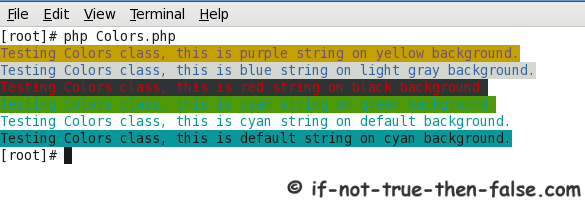
	echo $colors->getColoredString("Testing Colors class, this is purple string on yellow background.", "purple", "yellow") . "\n";
	echo $colors->getColoredString("Testing Colors class, this is blue string on light gray background.", "blue", "light_gray") . "\n";
	echo $colors->getColoredString("Testing Colors class, this is red string on black background.", "red", "black") . "\n";
	echo $colors->getColoredString("Testing Colors class, this is cyan string on green background.", "cyan", "green") . "\n";
	echo $colors->getColoredString("Testing Colors class, this is cyan string on default background.", "cyan") . "\n";
	echo $colors->getColoredString("Testing Colors class, this is default string on cyan background.", null, "cyan") . "\n";
Output:
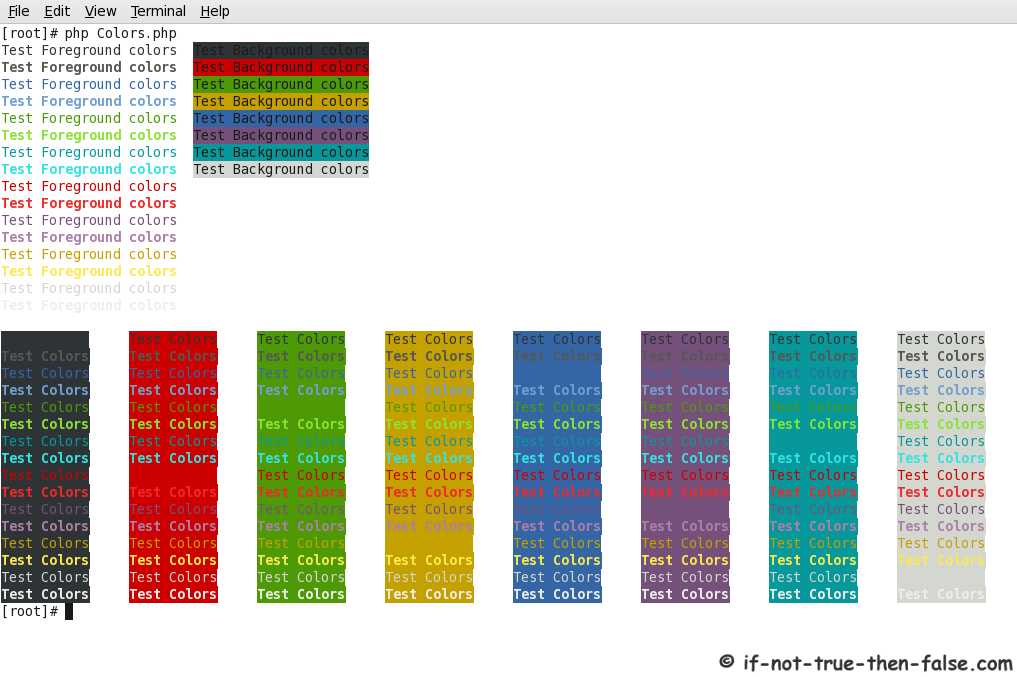
All Foreground and background colors printed⌗
<?php

		// Create new Colors class
		$colors = new Colors();

		// Get Foreground Colors
		$fgs = $colors->getForegroundColors();
		// Get Background Colors
		$bgs = $colors->getBackgroundColors();

		// Loop through all foreground and background colors
		$count = count($fgs);
		for ($i = 0; $i getColoredString("Test Foreground colors", $fgs[$i]) . "\t";
			if (isset($bgs[$i])) {
				echo $colors->getColoredString("Test Background colors", null, $bgs[$i]);
			}
			echo "\n";
		}
		echo "\n";

		// Loop through all foreground and background colors
		foreach ($fgs as $fg) {
			foreach ($bgs as $bg) {
				echo $colors->getColoredString("Test Colors", $fg, $bg) . "\t";
			}
			echo "\n";
		}
Output: