PHP: APC Configuration and Usage Tips and Tricks
Table of Contents

PHP APC (Alternative PHP Cache / Opcode Cache) is framework that optimizes PHP intermediate code and caches data and compiled code from the PHP bytecode compiler in shared memory. APC Opcode Cache is quickly becoming the de-facto standard PHP caching mechanism.
(adsbygoogle = window.adsbygoogle || []).push({});PHP APC installation is very easy, example with Fedora / CentOS / Red Hat (RHEL) you can check following guides to see howto install it:
Install Nginx/PHP-FPM on Fedora/CentOS/Red Hat (RHEL)
Install Apache/PHP on Fedora/CentOS/Red Hat (RHEL)
This PHP APC guide is divided on four different section:
1. PHP APC Configuration
2. Enable PHP APC Statistics
3. Howto Use PHP APC User Cache
4. PHP APC Performance Testing
1. PHP APC Configuration⌗
1.1 Find Your apc.ini File⌗
updatedb

locate apc.ini
Example location on Fedora/CentOS/RHEL /etc/php.d/apc.ini. You can use apc.ini as base and check following most important / all options.
1.2 PHP APC Most Important Configurations⌗
Enable APC Module⌗
extension = apc.so
Enable/Disable PHP APC⌗
apc.enabled=1
APC Number of Shared Memory Segments⌗
If APC is configured with mmap it only uses 1 shm_segment, then you could remove apc.shm_segments or use following:
apc.shm_segments=1
APC Size of Each Shared Memory Segments⌗
If you use just one memory segment, then set this value to total memory what you want to use. This value depends on available RAM size and required cache size. So first this could be example 128 Mb and when you see real usage then it’s easy to increase on decrease this limit.
apc.shm_size=128M

## just large memory example ##
apc.shm_size=2G
APC Cache Entries Time to Live (ttl)⌗
Normal configuration it’s good to set some ttl (time to live) value for cache entries. This is number of seconds how long cache entry is allowed to idle in a slot in case this cache entry slot is needed by another entry. This possible to set 0 (zero), but when cache is full then new items can’t be added, so I recommend some other value. PHP APC have two different ttl values one for cache entries apc.ttl (for php files) and apc.user_ttl (for user entries). Also own value for cache garbage-collection apc.gc_ttl. Following is just example setup:
## PHP file cache 1 hour ##
apc.ttl=3600

## User cache 2 hour ##
apc.user_ttl=7200

## Garbage collection 1 hour ##
apc.gc_ttl=3600
Max File Size on APC Cache⌗
Normally it’s wise cache only “small” files and this value is good to set example to default 1 Mb.
apc.max_file_size=1M
APC Stat (Check) the script if it has been modified⌗
This apc.stat could be powerful and dangerous option. Default value on, which force APC to stat (check) the script on each request to determine if it has been modified. In some cases, if you have files that are rarely modified, or if the project contains “too many” included files (per page load), such as a monstrous e-commerce project, then it’s very good to disable apc.stat. If you disable apc.stat then cache should be cleared every time you modified files.
## Normally set ##
apc.stat=1

## Or if you know what you're doing then set ##
apc.stat=0
(adsbygoogle = window.adsbygoogle || []).push({});### 1.3 Restart Your Web Server
When your configuration is done then just restart your web server and you have APC (Alternative PHP Cache) enabled on all PHP requests.
This PHP APC guide is divided on four different section:
1. PHP APC Configuration
2. Enable PHP APC Statistics
3. Howto Use PHP APC User Cache
4. PHP APC Performance Testing
This PHP APC guide is divided on four different section:
1. PHP APC Configuration
2. Enable PHP APC Statistics
3. Howto Use PHP APC User Cache
4. PHP APC Performance Testing
2. Enable PHP APC Statistics⌗
This is important part, if you want to see some statistics how APC Cache is working.
2.1 Find apc.php File⌗
updatedb

locate apc.php
Example location on Fedora/CentOS/RHEL /usr/share/doc/php-pecl-apc-3.1.10/apc.php.
2.2 Make apc.php File Public⌗
Here you can use create new virtual host for APC statictics or just copy apc.php file under some existing virtual host.
2.3 Configure apc.php File⌗
Modify at least following settings:
defaults('USE_AUTHENTICATION',1);
defaults('ADMIN_USERNAME','your-user-name'); // Admin Username
defaults('ADMIN_PASSWORD','your-password'); // Admin Password - CHANGE THIS TO ENABLE!!!
2.4 Check APC Statistics⌗
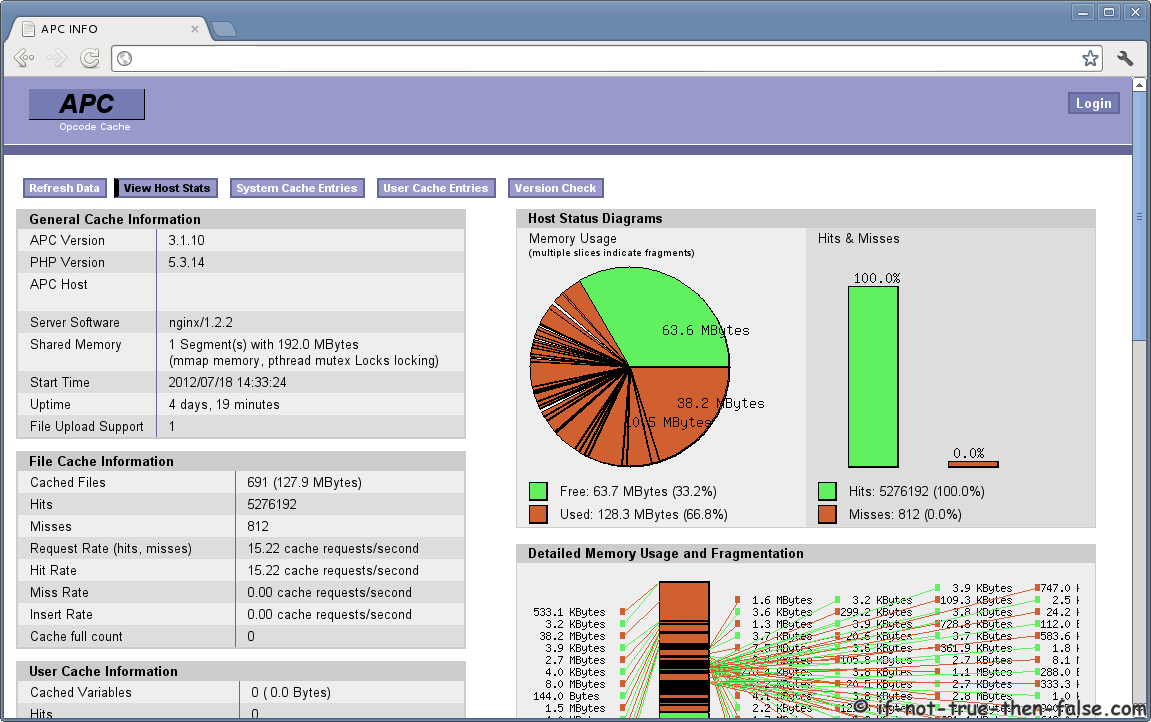
Open apc.php on your browser to see statistics. Your statisticss url could be example http://stats.your-domain.com/apc.php.
PHP APC Statictics Screenshot (APC 3.1.10, PHP 5.3.14, Nginx 1.2.2)
This PHP APC guide is divided on four different section:
1. PHP APC Configuration
2. Enable PHP APC Statistics
3. Howto Use PHP APC User Cache
4. PHP APC Performance Testing
This PHP APC guide is divided on four different section:
1. PHP APC Configuration
2. Enable PHP APC Statistics
3. Howto Use PHP APC User Cache
4. PHP APC Performance Testing
3. Howto Use PHP APC User Cache Examples⌗
3.1 PHP APC User Cache Example with Numeric Values⌗
Here is an example howto use apc_add, apc_cas, apc_fetch, apc_dec and apc_inc:
<?php
    // Add num variable to data store
    apc_add('num', 1);

    // Print initial value
    echo "Initial value: ", apc_fetch('num'), "";

    // Update old value with a new value
    apc_cas('num', 1, 10);

    // Print just updated value
    echo "Updated value: ", apc_fetch('num'), "";

    // Decrease a stored number
    echo "Decrease 1: ", apc_dec('num'), "";
    echo "Decrease 3: ", apc_dec('num', 3), "";

    // Increase a stored number
    echo "Increase 2: ", apc_inc('num', 2), "";
    echo "Increase 1: ", apc_inc('num'), "";
?>
Output:
Initial value: 1
Updated value: 10
Decrease 1: 9
Decrease 3: 6
Increase 2: 8
Increase 1: 9
(adsbygoogle = window.adsbygoogle || []).push({});### 3.2 PHP APC User Cache Example with String
This example shows howto use apc_fetch, apc_exists, apc_store, apc_clear_cache:
<?php
    // Check if str found from cache
    if (apc_exists('str')) {
        // Print str from cache
        echo "str from cache: ", apc_fetch('str'), "";
        // Clear cache
        apc_clear_cache('user');
        // Try to fetch str again
        echo "str from cache, after user cache is cleared: ", "";
        var_dump(apc_fetch('str'));
    }
    else {
        // Save str to cache and set ttl 120 seconds
        echo 'str not found from cache...saving', "";
        $str = "This is just test";
        apc_store('str', $str, 120);
    }
?>
First run output:
str not found from cache...saving
Second run output:
str from cache: This is just test
3.3 PHP APC User Cache Example with Array⌗
<?php
    // Check if arr found from cache
    if ($arr = apc_fetch('arr')) {
        echo "arr from cache: ", "";
        print_r($arr);
    }
    else {
        echo 'arr not found from cache...saving', "";
        $arr = array('Test 1', 'Test 2', 'Test 3');
        apc_add('arr', $arr, 120);
    }
?>
First run output:
arr not found from cache...saving
Second run output:
arr from cache:
Array ( [0] => Test 1 [1] => Test 2 [2] => Test 3 )
3.3 PHP APC User Cache Example with Object⌗
<?php
    // Simple Person class
    class Person {
        private $name;
        private $age;

        public function setName($name) {
            $this->name = $name;
        }

        public function setAge($age) {
            $this->age = $age;
        }

        public function getName() {
            return $this->name;
        }

        public function getAge() {
            return $this->age;
        }
    }

    // Check if Person object found from cache
    if ($obj = apc_fetch('person')) {
        echo "Person data from cache: ", "";
        echo "Name: ", $obj->getName(), "";
        echo "Age: ", $obj->getAge(), "";
    }
    else {
        echo 'Person data not found from cache...saving', "";
        $obj = new Person;
        $obj->setName('Test Person');
        $obj->setAge(35);
        apc_add('person', $obj, 3600);
    }
?>
First run output:
Person data not found from cache...saving
Second run output:
Person data from cache:
Name: Test Person
Age: 35
This PHP APC guide is divided on four different section:
1. PHP APC Configuration
2. Enable PHP APC Statistics
3. Howto Use PHP APC User Cache
4. PHP APC Performance Testing
This PHP APC guide is divided on four different section:
1. PHP APC Configuration
2. Enable PHP APC Statistics
3. Howto Use PHP APC User Cache
4. PHP APC Performance Testing
4. PHP APC Performance Testing⌗
This is very simple performance test setup just show that how powerful and important APC or any other Opcode Cache is. This test was carried out on CentOS 6.2 box, using APC 3.1.10, PHP 5.3.14 and Nginx 1.2.2.
4.1 Test Files on Web Server⌗
Two files test.php and test_include.php, basic idea is just include test_include.php file 50 000 times and check how long it takes.
test.php
<?php

     	$start = microtime(true);

        for ($i = 0; $i ";
        echo "End: " . $end . "";
        echo "Diff: ". ($end-$start) . "";

?>
test_include.php
<?php

     	$t =    "Lorem ipsum dolor sit amet, consectetur
                adipiscing elit. Cras non odio dolor,
                eget fermentum ligula. Nunc et risus at
                augue sollicitudin varius. Suspendisse
                vel mauris lacus, ac egestas mauris.
                Suspendisse dignissim massa id ligula
                scelerisque luctus. Etiam lobortis nisl
                lorem. Integer non velit ante. Nulla
                molestie consequat varius. Proin feugiat,
                tortor nec feugiat vestibulum, nisl odio
                aliquet est, in mollis sapien massa vitae
                ipsum. Cras volutpat nisi at metus
                volutpat at adipiscing ante pulvinar.
                Curabitur semper mauris risus. Aliquam non
                nunc eu nibh tincidunt condimentum aliquet
                eu magna. Sed lobortis consequat lorem a
                pellentesque. Ut vel odio sit amet elit
                porta pellentesque. Aliquam erat volutpat.";

?>
4.2 Performance Test Results⌗
APC Cache Disabled:
Start: 1326635645.6191
End: 1326635669.8046
Diff: 24.185463905334
APC Cache Enabled:
Start: 1326635808.3951
End: 1326635810.2877
Diff: 1.8925409317017
Difference is huge. With APC Cache disabled same script took 24.19 seconds and with APC Cache enabled it took only 1.89 seconds.
This PHP APC guide is divided on four different section:
1. PHP APC Configuration
2. Enable PHP APC Statistics
3. Howto Use PHP APC User Cache
4. PHP APC Performance Testing