Add date and time to Linux terminal title (Gnome Terminal, xterm, urxvt, rxvt)
terminal-logo-small

Here is easy way add date and time to Linux terminal title. This trick works at least following terminals Gnome Terminal, xterm, urxvt, rxvt.

Simply type the following command line:

while sleep 1 ; do echo -ne '\033]2;'`date`'\007'; done &
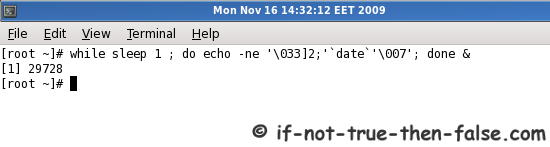
Date and time on terminal title

tools
Follow If Not True Then False Updates!

Leave a Comment

Your email address will not be published. Required fields are marked *

*

You may use these HTML tags and attributes: <a href="" title=""> <abbr title=""> <acronym title=""> <b> <blockquote cite=""> <cite> <code> <del datetime=""> <em> <i> <q cite=""> <strike> <strong> <pre lang="" line="" escaped="" highlight="">

mail
Bear