Install Eclipse SDK 4.2.2 (Juno) on Fedora 18/17, CentOS/RHEL 6.4/5.9
This is guide, howto install latest Eclipse SDK 4.2.2 (Juno) on Fedora, CentOS and Red Hat (RHEL). This guide should work with Fedora 18/17/16/15/14/13/12, CentOS 6.4/6.3/6.2/6.1/6/5.9 and Red Hat (RHEL) 6.4/6.3/6.2/6.1/6/5.9 and even with earlier versions.
Eclipse is a multi-language software development environment comprising an integrated development environment (IDE) and an extensible plug-in system. It is written primarily in Java and can be used to develop applications in Java and, by means of various plug-ins, other languages including C, C++, COBOL, Python, Perl, PHP, Scala and Ruby (including Ruby on Rails framework).
Install Eclipse SDK 4.2.2 (Juno) on Fedora 18/17, CentOS/Red Hat (RHEL) 6.4/5.9
1. Install Sun/Oracle Java JDK 7 or Java JDK 6
Install Sun/Oracle Java JDK 7 on Fedora, CentOS, Red Hat (RHEL)
Install Sun/Oracle Java JDK 6 on Fedora, CentOS, Red Hat (RHEL)
2. Download Eclipse SDK 4.2.2 (Juno)
Download suitable version from www.eclipse.org/downloads. This guide uses Eclipse Classic 4.2.2 version. Another popular versions are Eclipse IDE for Java EE Developers, Eclipse IDE for Java Developers and Eclipse for PHP Developers. Select also 32-bit or 64-bit version depending on your system.
3. Change root user
su - ## OR ## sudo -i |
4. Extract Eclipse package (example to /opt directory)
## x86 - 32-bit ## tar -xvzf eclipse-SDK-4.2.2-linux-gtk.tar.gz -C /opt ## x86_64 - 64-bit ## tar -xvzf eclipse-SDK-4.2.2-linux-gtk-x86_64.tar.gz -C /opt |
5. Add read permissions to all files
chmod -R +r /opt/eclipse |
6. Create Eclipse executable on /usr/bin path
touch /usr/bin/eclipse chmod 755 /usr/bin/eclipse ## Open eclipse file with your favourite editor ## nano -w /usr/bin/eclipse ## Paste following content to file ## #!/bin/sh export ECLIPSE_HOME="/opt/eclipse" $ECLIPSE_HOME/eclipse $* |
7. Create Gnome desktop launcher
## Create following file, with our favourite editor ## /usr/share/applications/eclipse.desktop ## Add following content to file and save ## [Desktop Entry] Encoding=UTF-8 Name=Eclipse Comment=Eclipse SDK 4.2.2 Exec=eclipse Icon=/opt/eclipse/icon.xpm Terminal=false Type=Application Categories=GNOME;Application;Development; StartupNotify=true |
8. Start Eclipse 4.2.2
From command line use eclipse command
eclipse |
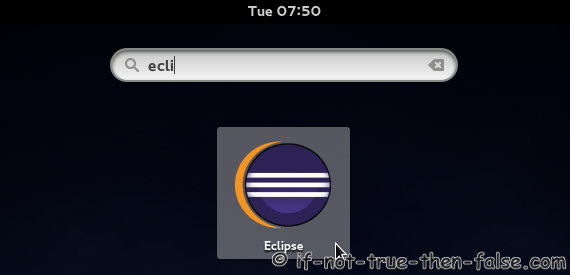
From Desktop menu Gnome 3 Eclipse 4.2.2
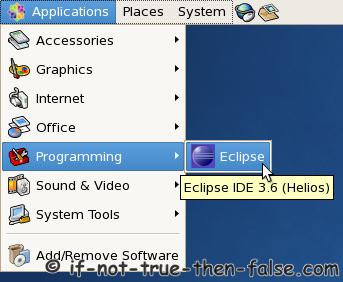
From Desktop menu Gnome 2 and Eclipse 3.6 (Helios)
9. Eclipse 3.6 screenshots, running (and starting) on Fedora 13 32-bit and CentOS 5.5 64-bit
Eclipse 3.6 running on Fedora 13 32-bit
Eclipse 3.6 running on CentOS 5.5 64-bit
Troubleshooting
If you get something like following errors:
Failed to load the JNI shared library /usr/java/jdk1.6.0_21/jre/bin/../lib/i386/client/libjvm.so
Or
/usr/java/jdk1.6.0_21/jre/bin/../lib/i386/client/libjvm.so: cannot enable executable stack as shared object requires: Permission denied
Then do following:
chcon -t execmem_exec_t '/opt/eclipse/eclipse' |
and try again.
137 Comments
Leave a Comment
Trackbacks/Pingbacks
- Android SDK and Eclipse ADT on Fedora 13, CentOS 5.5, RHEL 5.5/6 | If Not True Then False - [...] Your Development Computer and Install Required softwares1.1 Install Sun/Oracle Java JDK/JRE1.2 Install Eclipse SDK 3.6 (Helios)2. Install Andoid SDK2.1 ...


I am a linux newbie and have been trying to install Eclipse 3.7 on Ubuntu 10.4. I looked at your guide and comments and saw a reference to my problem:
Could not launch Eclipse. Failed to launch child process ‘eclipse’ No such file or directory.
I saw your response about mismatched 32 and 64 bit versions of eclipse and java. I checked and I believe I am running 32 bit ubuntu, 32 bit eclipse and a 32 bit jvm. Could you possibly help me further as to why I can’t launch eclipse?
Thanks
Mike O’Brien
I too have the problem when I try to launch eclipse from “application->programming->eclipse” I have the following message:
Could not launch eclipse
Failed to execute child process “eclipse” (no such file or directory)
I verified that I am running 32 bit ubuntu 10.04, 32 bit eclipse V3.7, and a 32 bit java. Thus the answer above for this problem doesn’t seem to apply to me.
Any suggestions?
Hi Mike,
What happens if you try to start it directly from command line:
If if fails again then I recommend you to remove eclipse directory download Eclipse 3.7.1 again and go thru again this installation procedure.
hi mike..
got your problem,you need to set proper path for “Exec” field in your desktop launcher file (of your eclipse executable file) i.e
“Exec=/path/to/your/eclipse_package/eclipse”.
This tutorial made me happy! It’s not often I find exactly what I was looking for on the web. This is one of those rare finds: clear, concise, and it works!
One word: Bravo!
Hi, great article.. I have been trying to install anjuta IDE for GTK because i wanted to compile a c project which has GTK GUI. But it gave dependency errors, after trying too much i was unable to install it, so i turned to eclipse.
Could it be possible to compile c/GTK project in eclipse?, if yes how to install GTK package in eclipse I have Redhat Linux 6.0 64 bit version, waiting for your positive reply
Hi Pranav,
Maybe you could try to install Eclipse CDT and even pkg-config-support-for-eclipse-cdt.
What errors you got with Anjuta IDE?
I got :error: Failed dependencies:
autogen is needed by anjuta-1:3.2.0-1.fc16.x86_64
glade3-libgladeui >= 3.9.2 is needed by anjuta-1:3.2.0-1.fc16.x86_64
libc.so.6(GLIBC_2.14)(64bit) is needed by anjuta-1:3.2.0-1.fc16.x86_64
libcairo-gobject.so.2()(64bit) is needed by anjuta-1:3.2.0-1.fc16.x86_64
libdevhelp-3.so.0()(64bit) is needed by anjuta-1:3.2.0-1.fc16.x86_64
libgda-4.0.so.4()(64bit) is needed by anjuta-1:3.2.0-1.fc16.x86_64
libgda-sqlite >= 4.2.0 is needed by anjuta-1:3.2.0-1.fc16.x86_64
libgdk-3.so.0()(64bit) is needed by anjuta-1:3.2.0-1.fc16.x86_64
libgdl-3.so.1()(64bit) is needed by anjuta-1:3.2.0-1.fc16.x86_64
libgladeui-2.so.0()(64bit) is needed by anjuta-1:3.2.0-1.fc16.x86_64
libgtk-3.so.0()(64bit) is needed by anjuta-1:3.2.0-1.fc16.x86_64
libgtksourceview-3.0.so.0()(64bit) is needed by anjuta-1:3.2.0-1.fc16.x86_64
libpython2.7.so.1.0()(64bit) is needed by anjuta-1:3.2.0-1.fc16.x86_64
libstdc++.so.6(GLIBCXX_3.4.15)(64bit) is needed by anjuta-1:3.2.0-1.fc16.x86_64
libvala-0.14.so.0()(64bit) is needed by anjuta-1:3.2.0-1.fc16.x86_64
libvte2_90.so.9()(64bit) is needed by anjuta-1:3.2.0-1.fc16.x86_64
libwebkitgtk-3.0.so.0()(64bit) is needed by anjuta-1:3.2.0-1.fc16.x86_64
when i tried to install dependencies such as libgda,gtk+-3.2 etc packages then packages showed another dependencies.. and so on
Now i am downloading eclipse CDT,
anyway, thanks for the help JR
I actually just test yum install anjuta and my output looks following on Fedora 16:
So anjuta with dependencies is installed smoothly.
You could maybe try run:
yum clean allan try installation again.
Do you get Eclipse CDT working? :)
Thank you for this tutorial, really clear and easy to follow. And it worked!
I GOT THIS ERROR AFTER INSTALLING ECLIPSE IN THE SAME WAY U TOLD.
Locking is not possible in the directory “/opt/eclipse/configuration/org.eclipse.osgi”. A common reason is that the file system or Runtime Environment does not support file locking for that location. Please choose a different location, or disable file locking passing “-Dosgi.locking=none” as a VM argument.
/opt/eclipse/configuration/org.eclipse.osgi/.manager/.fileTableLock (Permission denied)
Hi Vikash,
Just tested this guide and updated it to latest 3.7.2 version. For me this is working normally. Do you have right permissions on /opt/eclipse directory?
HI ALl.
I have done all the steps as suggested here,but when i try to open eclipse by cmd “eclipse”
it says ” can not execute /opt/eclipse/eclipse” binary file
PLease help me in insolving this issue’
Hi Jay,
Could you post output of following commands:
I got this problem when I tried running a 64 bit Eclipse on a 32 bit Fedora. Fixed by downloading the 32 bit version instead.
worked perfectly. Thanks for the info. :)
This is a good post, I’m little bit trouble in nano. If you are trouble with it, use vim editor
vi /usr/bin/eclipse
vi /usr/share/applications/eclipse.desktop
Thanks
thanks for help
I did all the above but the icon didn’t show on desktop or through the menu of programs , any way, when i type “eclipse” in terminal it works fine, my question is ; how do you remove it !? I tried using add/delete software but it’s not seeing it as a package,I tried “yum remove eclipse” but it’s not seeing it, please help, thank you
hi..
TO RUN:
check the paths you had given for “Exec” and “Icon” fields in your desktop launcher file(eclipse.desktop).
TO REMOVE:
if you have followed the above steps only to install then in order to remove eclipse, simply remove the directory of eclipse.
Thank you very much for the tips! I was able to install Eclipse on CentOS effortlessly.
tar -xvzf should be tar xvzf
Hi jintux,
Why it should be without dash? It’s exactly same command. Some versions of tar even may require a dash before the option string.
Thanks, Eclipse Juno is latest now.
help me
i got following error
could not execute “/opt/eclipse/eclipse” binary file
then what i have to do
Hi paramesh,
Did you tried it as normal user or root?
Could you post output of following command:
Thanks so much! Works great for me! I’m using Fedora 16 with Eclipse JRE (Juno) 4.2.
@betaroot and @Dave D
Thanks, I updated guide to latest Eclipse 4.2 Juno. :)
i got following error
could not execute “/opt/eclipse/eclipse” binary file
i have tried as root user
the out put of
ls -la /opt/eclipse is as follows
[root@localhost bin]# ls -la /opt/eclipse
total 864
drwxr-xr-x 9 507 1109 4096 Feb 8 23:20 .
drwxr-xr-x 3 root root 4096 Jul 6 10:16 ..
drwxr-xr-x 2 507 1109 4096 Feb 8 23:20 about_files
-rw-r–r– 1 507 1109 18909 Feb 8 19:25 about.html
-rw-r–r– 1 507 1109 95576 Feb 8 23:20 artifacts.xml
drwxr-xr-x 5 507 1109 4096 Feb 8 23:20 configuration
drwxr-xr-x 2 507 1109 4096 Feb 8 23:20 dropins
-rwxrwxrwx 1 507 1109 71023 Feb 8 19:46 eclipse
-rw-r–r– 1 507 1109 279 Feb 8 23:20 eclipse.ini
-rw-r–r– 1 507 1109 59 Feb 8 19:06 .eclipseproduct
-rw-r–r– 1 507 1109 16536 Feb 8 19:06 epl-v10.html
drwxr-xr-x 167 507 1109 28672 Feb 8 23:20 features
-rw-r–r– 1 507 1109 9022 Feb 8 19:24 icon.xpm
-rwxr-xr-x 1 507 1109 335360 Feb 8 19:24 libcairo-swt.so
-rw-r–r– 1 507 1109 8951 Feb 8 19:06 notice.html
drwxr-xr-x 4 507 1109 4096 Feb 8 23:19 p2
drwxr-xr-x 35 507 1109 155648 Feb 8 23:20 plugins
drwxr-xr-x 2 507 1109 4096 Feb 8 23:20 readme
[root@localhost bin]#
Could you also post output of following command:
java -versionDid you change /opt/eclipse/eclipse permissions?
Juno Eclipse does not work well with JDK 7, but with JDK6, I suggest first checking the JDK version you have, necessarily LibreOffice uses JDK 7 and so far both can not operate in the same fedora XD¡¡¡ , I hope this review helps.
Awesome thanks for the blog…….. I could successfully install Eclipse Juno 4.2
Hi! I installed Eclipse on Fedora 17 following your guide and it ran fine until today, the executable refused to luanch from the desktop icon or from the terminal so I ran chmod 775 it, and then ran it from the terminal. I was then bombared with these messages:
/usr/bin/eclipse: line 3864: conservatizing: command not found
/usr/bin/eclipse: line 3865: consonantize: command not found
/usr/bin/eclipse: line 3866: consonantizes: command not found
/usr/bin/eclipse: line 3867: constitutionalization: command not found
/usr/bin/eclipse: line 3887: $'constitutionalizations\nconstitutionalizations\nconstitutionalize\nconstitutionalizes\ncontainerization\ncontainerize\ncontainerized\ncontainerizes\ncontainerizing\ncontemporization\ncontemporize\ncontemporized\ncontemporizes\ncontemporizing\ncontroversialize\ncontroversializes\nconundrumize\nconundrumizes\nconventionalization\nconventionalizations': command not found
After the messages finish, Ark runs…I’m not sure what happened, the only thing I did today was install AbiWord using yum. Any ideas? Thanks!
Hi Saaraneth,
Could you post output of following commands:
Thanks so much for your help, JR! I figured it out after the cat command. I was trying to enable spellcheck in Eclipse, so I downloaded a dictionary of words, and must have accidentally overwritten /usr/bin/eclipse with the dictionary. I’ve replaced the file and everything is fine again.
You are welcome! Excellent to hear that you got it working! :)
GREAT Thank you!
The eclipse.desktop file wont work because since Fedora 17 latest Updates (6.09.12) you dont can use GNOME as category. This here works:
[Desktop Entry]
Encoding=UTF-8
Name=Eclipse
Comment=Eclipse SDK 4.2
Exec=/bin/sh "/opt/eclipse/eclipse"
Icon=/opt/eclipse/icon.xpm
Categories=Development;
Version=1.0
Type=Application
Terminal=false
Hi thorty,
I just tested this on Fedora 17, with latest updates and following works normally for me:
By far! this is the best website for linux users, thanks for this, thanks a lot for your very good and well done guides!
Hi César,
Thank you very much! Nice to hear that you like my guides! :)
thank you
Thanks JR.
This is the seconnd guide I follow from you. Just Awesome both of them. Just one question:
The Icon won’t show on the desktop. Fedora 17 latest update. Eclipse, Java and SDK working like a charm.
Here is my eclipse.desktop:
[Desktop Entry]
Encoding=UTF-8
Name=Eclipse
Comment=Eclipse SDK 4.2.1
Exec=eclipse
Icon=/home/armando/eclipse/icon.xpm
Terminal=false
Type=Application
Categories=GNOME;Application;Development;
StartupNotify=true
Thank you Thank you Thank you
Hi Zuken,
Nice to hear that you have found useful guides.
What you mean “The Icon won’t show on the desktop”?
You should look from Activities and Application menu.
Very nice guide! Everything worked as described.
Except for one problem. I have installed Eclipse 4.2.1 on CentOS 6.3. I am not exactly sure if this has to do with the setup procedure, but I am running into a problem where Eclipse cannot access environment variables set by ~/.bashrc. I am also not sure if this has to do with CentOS 6.3.
BTW, I am using Eclipse 4.2.1 locally on a RHEL 5.8 system with the exact environment variable setup (in ~/.bashrc), and I don’t have the problem.
Please do share if you have any thoughts on why the environment variables are not getting read by Eclipse. Thanks.
Hi TP,
Do you try to read these environment variables using Java on Eclipse or are you setting some Eclipse/Java/Ant environment variables?
The ~/.bashrc file is (normally) read and sourced by bash when a non-login interactive shell is started, for example, when you open a virtual console from the desktop environment.
Hi JR,
Actually, these environment variables used by one of Eclipse plugins. So it is the latter case.
Meanwhile I tried something else. I unpacked the Eclipse package under my home (i.e. $HOME/tools/eclipse). The environment variables are then picked up by the local version of Eclipse. BTW, it is launched from a terminal window. Of course, that also means I didn’t create a desktop launcher for this.
Needless to say, I also tried to run the Eclipse installed under /opt/eclipse from a terminal window, but that did not help.
Thanks.
Hi again TP,
Sounds like .bashrc is working as it should work, environment variables work when you start local installation from command line. I recommend you to set your variables globally under /etc/profile.d/.
1. Create file:
/etc/profile.d/my_eclipse_plugin.sh
2. Then add your variables to this file, like:
3. Then reboot your system or try:
Awesome tutorial and website!