Install VirtualBox Guest Additions on Fedora 16/15, CentOS/RHEL 6/5.7
This is guide, howto install Oracle VirtualBox Guest Additions on Fedora, CentOS and Red Hat (RHEL). This guide should work with Fedora 16, Fedora 15, Fedora 14, Fedora 13, Fedora 12, CentOS 6/5.7, Red Hat (RHEL) 6.1/6/5.7.
VirtualBox Guest Additions is special software that can be installed inside Linux virtual machines to improve performance and make integration much more seamless. Among the features provided by these VirtualBox Guest Additions are mouse pointer integration and arbitrary screen solutions (e.g. by resizing the guest window).
Install VirtualBox Guest Additions on Fedora, CentOS and Red Hat (RHEL)
1. Change root user
su - ## OR ## sudo -i
2. Mount VirtualBox Guest Additions
Click Devices > Install Guest Additions… on VirtualBox
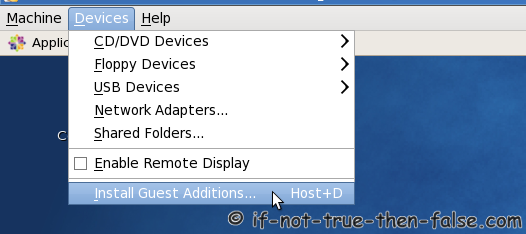
Mount VirtualBox Guest Additions device
mkdir /media/VirtualBoxGuestAdditions mount -r /dev/cdrom /media/VirtualBoxGuestAdditions
3. Make sure that you are running latest kernel
Update virtual machine kernel and reboot
yum update kernel*
reboot4. Install following packages
yum install gcc kernel-devel kernel-headers
5. Add KERN_DIR environment variable
## Current running kernel on Fedora ## KERN_DIR=/usr/src/kernels/`uname -r` ## Current running kernel on CentOS and Red Hat (RHEL) ## KERN_DIR=/usr/src/kernels/`uname -r`-`uname -m` ## Fedora example ## KERN_DIR=/usr/src/kernels/2.6.33.5-124.fc13.i686 ## CentOS and Red Hat (RHEL) example ## KERN_DIR=/usr/src/kernels/2.6.18-194.11.1.el5-x86_64 ## Export KERN_DIR ## export KERN_DIR
6. Install Guest Additions
cd /media/VirtualBoxGuestAdditions # 32-bit and 64-bit systems run following ./VBoxLinuxAdditions.run
Output looks like following:
[root@fedora VBoxGuestAdditions]# ./VBoxLinuxAdditions.run Verifying archive integrity... All good. Uncompressing VirtualBox 4.1.6 Guest Additions for Linux......... VirtualBox Guest Additions installer Removing installed version 4.1.6 of VirtualBox Guest Additions... Removing existing VirtualBox DKMS kernel modules [ OK ] Removing existing VirtualBox non-DKMS kernel modules [ OK ] Building the VirtualBox Guest Additions kernel modules Building the main Guest Additions module [ OK ] Building the shared folder support module [ OK ] Building the OpenGL support module [ OK ] Doing non-kernel setup of the Guest Additions [ OK ] You should restart your guest to make sure the new modules are actually used Installing the Window System drivers Installing X.Org Server 1.11 modules [ OK ] Setting up the Window System to use the Guest Additions [ OK ] You may need to restart the hal service and the Window System (or just restart the guest system) to enable the Guest Additions. Installing graphics libraries and desktop services componen[ OK ]
7. Reboot guest system
reboot
Then VirtualBox Guest Additions install is ready.
Check also:
Install VirtualBox (with yum) on Fedora, CentOS, Red Hat (RHEL)
Related posts:
- Install VirtualBox 4.1.8 on Fedora 16/15, CentOS/Red Hat (RHEL) 6.2/5.7
- Install Sun/Oracle Java JDK/JRE 7u2 on Fedora 16/15, CentOS/RHEL 6.2/5.7
- Install SVN (Subversion) Server on Fedora 16/15, CentOS/Red Hat (RHEL) 6/5.7
- Install Apache/PHP 5.3.10 on Fedora 16/15, CentOS/Red Hat (RHEL) 6.2/5.7
- Install Adobe Reader on Fedora 16/15, CentOS/RHEL 6.2/5.7
26 Comments
Leave a Comment
Trackbacks/Pingbacks
- Install VirtualBox 3.2.8 on Fedora 13, CentOS 5.5, Red Hat (RHEL) 6 | If Not True Then False - [...] Groupusermod -a -G vboxusers user_nameStart VirtualBoxUse launcher or simply:VirtualBoxCheck also:Install VirtualBox Guest Additions on Fedora 13, CentOS 5.5, Red ...
- Инсталяция virtualbox 4 guest additions на centos 5. | Якши Гора - [...] Вот классная ссылка на статью о том как устанавливать virtualbox guest additions на centos 5: Install VirtualBox Guest Additions ...
One tweak to this :
The kernel headers on an ia32 Centos install have a trailing ‘ -i686′
thus KERN_DIR=/usr/src/kernels/`uname -r`-i686
Hi telnet,
Excellent addition. I added your tweak to this manual, but I used following method:
Now this KERN_DIR with kernel version and 32-bit (i386/i686) and 64-bit (x86_64) architecture should work on CenOS and Red Hat (RHEL) without problems.
JR,
In my experience with this tutorial (thank you, btw) I spent an upwards of five hours toying with this. I am running the newest version of VirtualBox (not sure which one) and Centos 5.5. After a lot of persistence, I found that the only way I could get this method to work was to change the permissions of the VBoxLinuxAdditions-x86.run file! Like a madman I kept trying and trying, so after eliciting [ls -l] I saw that even as root, I did not have permissions to execute it! I elicted the command [chmod +x VBoxLinuxAdditions-x86] as root and executed after your step #4 above to get this to work. I hope this helps somebody else. Lucky for me I had some free time today and didn’t give up. Thanks for writing this!
Thank you very much, it worked like charm.
Works great. Really appreciate your help.
Thanks for the guide, I’m having an issue with the guest additions though.
My host machine is 32bit Win7 and the guest machine I’m installing is CentOS 5.5 32bit.
It seems to install fine and so do the guest additions, and the resolution resizes fine which is great.
Unfortunately the cursor on the CentOS is displayed as 2 cursors with the left being the active one. It’s a weird double image kind of thing.
Not a show stopper, just very annoying.
When installing the guest additions everything installed [ OK ] but it said that openGL and 3d hardware acceleration were not supported and that I’d have to update the linux kernel if I wanted support. I couldn’t care less, but perhaps that’s related to the double cursor?
Aside: I’m fairly new to all things linux.
3d support isn’t kernel update related like I thought:
http://www.virtualbox.org/manual/ch04.html#guestadd-3d
and it doesn’t fix the odd double pointer issue.
I played about for a while trying to install the VBoxAdditions with the slightly different method outlined here:
http://www.windofkeltia.com/notes/sunvbox.html#kernel
Amounted to the same.
I’m confused though, my kernel sourc dir is:
/usr/src/kernels/2.6.18-194.17.4.el5-i686/
which is listed as Fedora in your example, even though it’s CentOS 5.5 I’m installing.
Like I said, I’m a linux noob so I’m sure the answer is obvious.
My host machine is a windows box, nvidia graphics card and drivers.
I have a dual monitor setup, both rotated 90 degrees so they’re vertical.
If I flip a monitor back to horizontal and move the guest VM window to that machine the surplus pointer disappears.
Sigh.
Hi justsomeguy,
Sounds weird problem, but your kernel source dir looks just OK. You have 32-bit CentOS kernel source dir.
It is a little unclear, did you get that problem fixed?
If not then you maybe could take screenshot about that problem and post it to some image service, like imageshack?
annoying workaround:
- When the monitor is in normal horizontal mode, the mouse pointer is perfectly normal.
- If I flip the monitor in the windows host OS using nvidia control panel (and actually flipping the monitor 90 degrees clockwise), centOS adjusts to the new screen size [1200x1600], and the cursor goes back to being displayed as two cursors one beside the other.
Sorry if I’m not being clear.
I tried to take a screenshot but centOS removes the mouse pointer from screenshots!
@justsomeguy
Are you fix problem with two (double) cursors?
To fix the two cursors problem you have to disable the mouse integration !
Thank you this worked perfectly for me with one tweak. I had to run VBoxLinuxAdditions-amd64.run like this:
sh ./VBoxLinuxAdditions-amd64.runbecause the file system was mounted read-only.Hi JR,
excelent tutorial. After linux guest additions on centos 5.5 went fine, i try to switch from GUI (Ctrl+Alt+F7) and CLI (Ctrl+Alt+F1-F6), but screen is black when i switch again from CLI to GUI. Do you have some work arround for this? Thanks.
Hi maronio,
You could use Hostkey+F1-F7 to change from CLI to GUI and vice versa. Hostkey is normally Right Ctrl button.
Thank you so for this tutorial!!! Really Really Helpful!!!!
I have a suggestion, i.e IF you could do a howto on web interface for VirtualBox that would be great, I have tried it but unsuccessful… I am using VB 3.2.12 on Linux Mint 10..
Very good! It’s works fine! Tks
[root@localhost Desktop]# sh ./VBoxLinuxAdditions.run
Verifying archive integrity… All good.
Uncompressing VirtualBox 4.1.4 Guest Additions for Linux………
VirtualBox Guest Additions installer
Removing installed version 4.1.4 of VirtualBox Guest Additions…
Removing existing VirtualBox DKMS kernel modules [ OK ]
Removing existing VirtualBox non-DKMS kernel modules [ OK ]
Building the VirtualBox Guest Additions kernel modules
The headers for the current running kernel were not found. If the following
module compilation fails then this could be the reason.
The missing package can be probably installed with
yum install kernel-devel-2.6.32-71.el6.i686
Building the main Guest Additions module [FAILED]
(Look at /var/log/vboxadd-install.log to find out what went wrong)
Doing non-kernel setup of the Guest Additions [ OK ]
Installing the Window System drivers
Installing X.Org Server 1.7 modules [ OK ]
Setting up the Window System to use the Guest Additions [ OK ]
You may need to restart the hal service and the Window System (or just restart
the guest system) to enable the Guest Additions.
Installing graphics libraries and desktop services componen[ OK ]
[root@localhost Desktop]#
please help me on this
Hi suresh,
Did you installed gcc, kernel-devel and kernel-headers packages with following command:
I’ve had the same problem although I had already installed gcc, kernel-devel and kernel-headers packages.
When I looked at /var/log/vboxadd-install.log file it said that KERN_DIR did not point to a directory.
I solved it with the command (and then rebooting the vm):
yum install kernel*
which I saw in this discussion:
http://www.oraclenerd.com/2011/03/oel-6-virtualbox-guest-additions.html
It installed other dependencies needed for the kernel.
This warning that you have I also had and it disappeared after running the above command.
“The headers for the current running kernel were not found. If the following
module compilation fails then this could be the reason.
The missing package can be probably installed with
yum install kernel-devel-2.6.32-71.el6.i686″
Then VBoxGUestAdditions installation worked properly.
I hope this helps!!!
Hi Tarciso,
This is normal problem if you are running old kernel on virtual machine and thanks for note I add this to this guide too, because someone else might also run old kernel… :)
On a CentOs 6 (clean install) machine I had to also install make and perl before running the ./VBoxLinuxAdditions.run script.
Thanks for these instructions.
Cheers!
In Centos 6.0 works great, thanks! :-)
hi! where should i install the Guest Addition? on the guest machine? do i have to type all of those code on the guest machine? what if i use windows on the guest machine?
Hi renegado,
This is method, howto install VirtualBox Guest Additions on Fedora 16/15, CentOS/RHEL 6/5.7. So this is not Windows guest method.
On Windows click “Install Guest Additions…” and if you have “autostart” enabled then installer should start and if it’s not starting then find VBoxWindowsAdditions.exe from VirtualBox CD and run it. Then you should see installer/wizard… :)
You legend, ive been looking for hours to guest additions to play ball, this worked like a charm
Thanks!!!