Android SDK and Eclipse ADT on Fedora 16/15, CentOS/RHEL 6
This is guide howto install Android SDK Tools r16 and Eclipse ADT (Android Development Tools) Plugin on Fedora 16, Fedora 15, Fedora 14, Fedora 13, CentOS 6.2/6.1/6 and Red Hat (RHEL) 6.2/6.1/6.
This Guide Contents
- 1. Preparing Your Development Computer and Install Required softwares
- 2. Install Andoid SDK
- 3. Install ADT Plugin for Eclipse
- 4. Configure Eclipse and Install Latest Android SDK with AVD Manager
- 5. Create Simple Android Test Project
1. Preparing Your Development Computer and Install Required softwares
1.1 Install Sun/Oracle Java 7 JDK/JRE
1.2 Install Eclipse SDK 3.7 (Indigo)
2. Install Andoid SDK
2.1 Change root user
su -
## OR ##
sudo -i
2.2 Download and Install Android SDK
## Select place to download
cd /tmp
## Download Android SDK r16 package for Fedora, Red Hat (RHEL) ##
wget http://dl.google.com/android/android-sdk_r16-linux.tgz
su - ## OR ## sudo -i |
## Select place to download cd /tmp ## Download Android SDK r16 package for Fedora, Red Hat (RHEL) ## wget http://dl.google.com/android/android-sdk_r16-linux.tgz |
Note: Latest SDK r16 (Android 2.3 Gingerbread and 3.x Honeycomb) emulator is currently working only with Glibc 2.7 or greater, so that’s why CentOS 5.7 and Red Hat (RHEL) 5.7 needs a newer version of Glibc to run Android SDK tools. This is possible to get working with manually build GNU C Library (glibc) 2.7 or later on CentOS 5.7 or Red Hat (RHEL) 5.7, but this might cause much problems and that’s why here is not now guidance for that.
Errors on CentOS 5.7 and Red Hat (RHEL) 5.7 looks following:
/opt/android-sdk/tools/emulator: /lib/libc.so.6: version `GLIBC_2.8′ not found (required by /opt/android-sdk/tools/emulator) /opt/android-sdk/tools/emulator: /lib/libc.so.6: version `GLIBC_2.7′ not found (required by /opt/android-sdk/tools/emulator) /opt/android-sdk/tools/emulator: /lib/libc.so.6: version `GLIBC_2.11′ not found (required by /opt/android-sdk/tools/emulator) |
2.2 Extract Android SDK
## Extract Android SDK r16 ## tar -xvzf android-sdk_r16-linux_x86.tgz |
2.3 Move Android SDK to right location
## Move Android SDK example to /opt mv android-sdk-linux_x86/ /opt/android-sdk |
2.3 Add Write Permissions to /opt/android-sdk
## Following add write permissions for all users chmod -R a+w /opt/android-sdk ## On multi-user environment, better way is add permissions only for selected users or group |
2.4 Add Android SDK into PATH environment variable
Add following lines to /etc/profile or $HOME/.bash_profile
PATH=$PATH:/opt/android-sdk:/opt/android-sdk/tools:/opt/android-sdk/platform-tools export PATH |
2.5 64-bit Systems needs following 32-bit system packages
yum install glibc.i686 glibc-devel.i686 libstdc++.i686 zlib-devel.i686 ncurses-devel.i686 libX11-devel.i686 libXrender.i686 libXrandr.i686 |
3. Install ADT Plugin for Eclipse
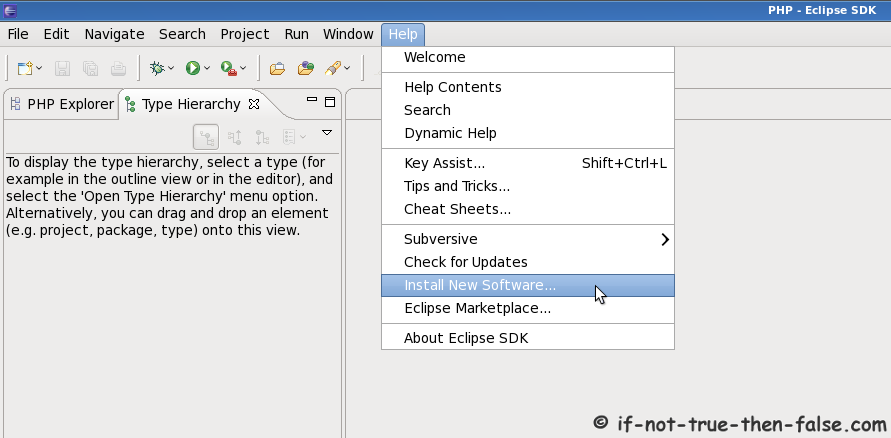
3.1 Open Install New Software window (Help -> Install New Software…)
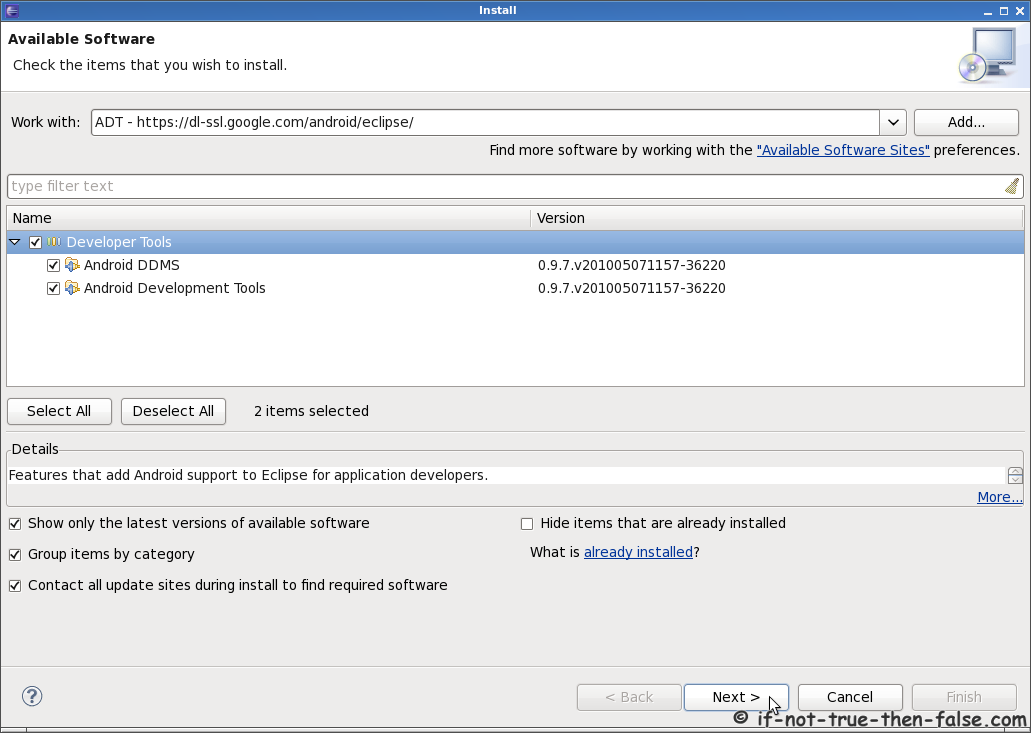
3.2 Add ADT Plugin repository
Name: ADT
Location: https://dl-ssl.google.com/android/eclipse/
3.3 Select Android DDMS and Android Development Tools
Note If you get something like following error:
The operation cannot be completed. See the details.
Cannot complete the install because one or more required items could not be found.
Software being installed: Android Development Tools 0.9.7.v201005071157-36220 (com.android.ide.eclipse.adt.feature.group 0.9.7.v201005071157-36220)
Missing requirement: Android Development Tools 0.9.7.v201005071157-36220 (com.android.ide.eclipse.adt.feature.group 0.9.7.v201005071157-36220) requires ‘org.eclipse.gef 0.0.0′ but it could not be found
Then simply add Eclipse Indigo repository:
Name: Indigo
Location: http://download.eclipse.org/releases/indigo
And try Install Android Development Tools again.
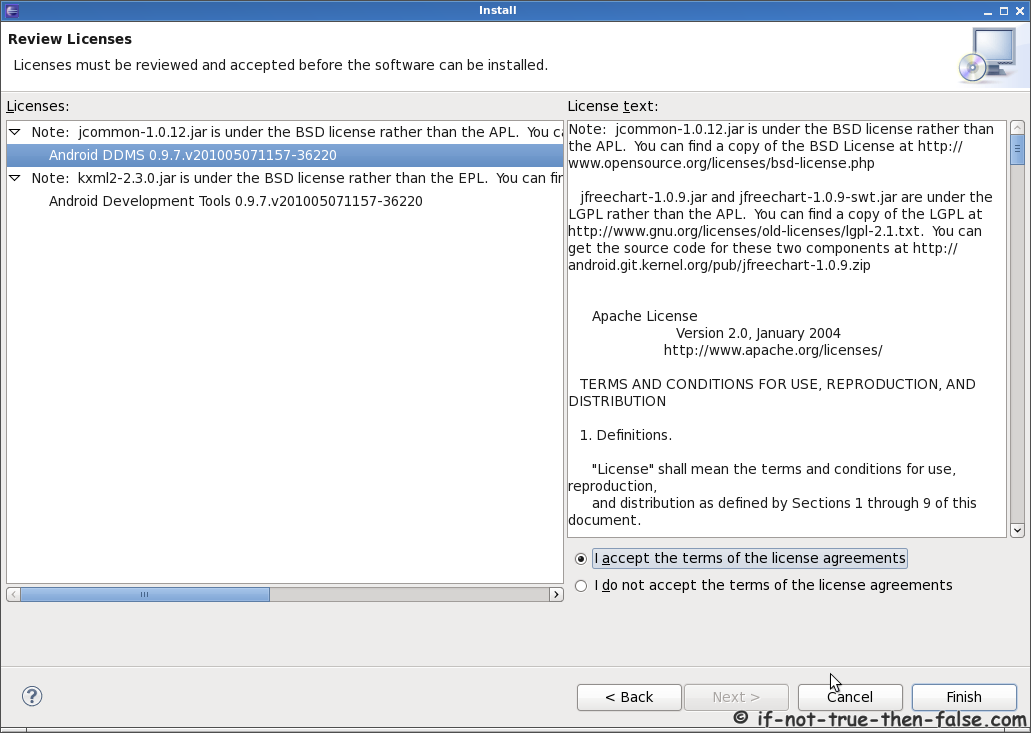
3.3 Accept ADT Licenses
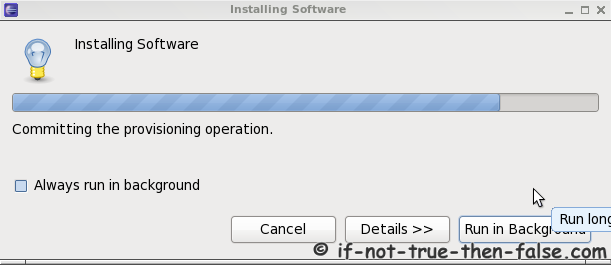
3.4 Install ADT and restart Eclipse
4. Configure Eclipse and Manage Android SDKs and Virtual Devices (AVD)
4.1 Add Android SDK path to Eclipse settings
Open menu Window -> Preferences
4.2 Start Android SDK and AVD Manager from Menu
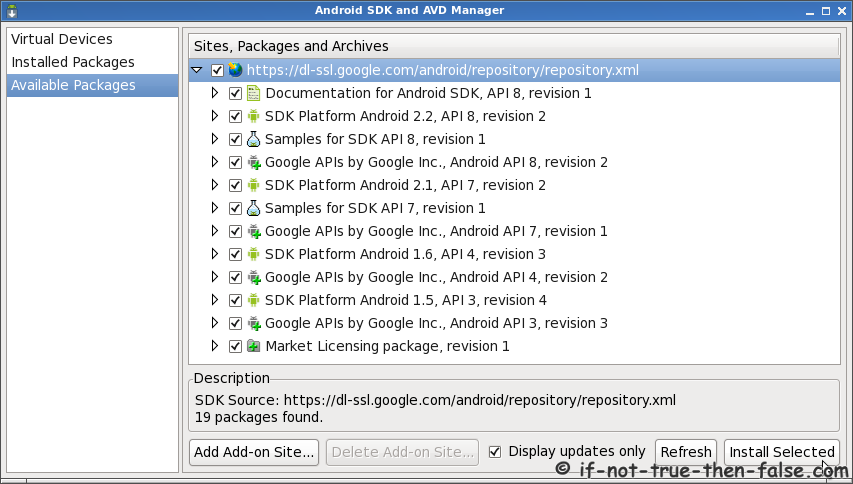
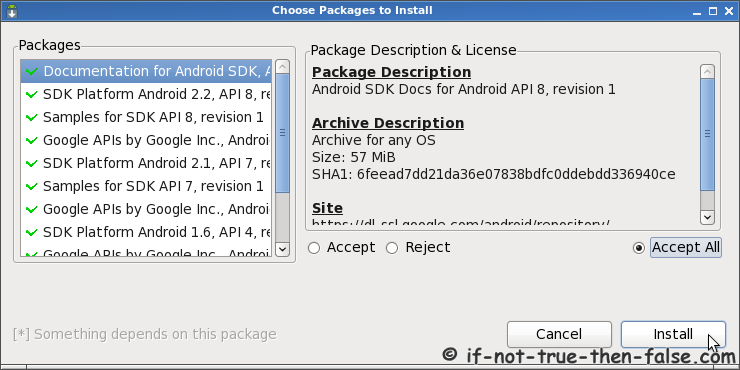
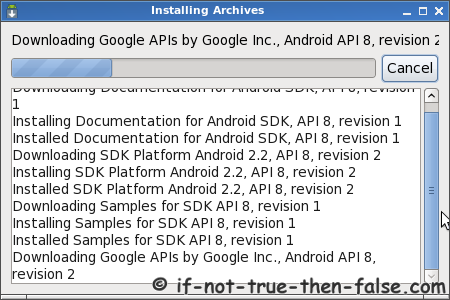
4.3 Install All Needed SDKs
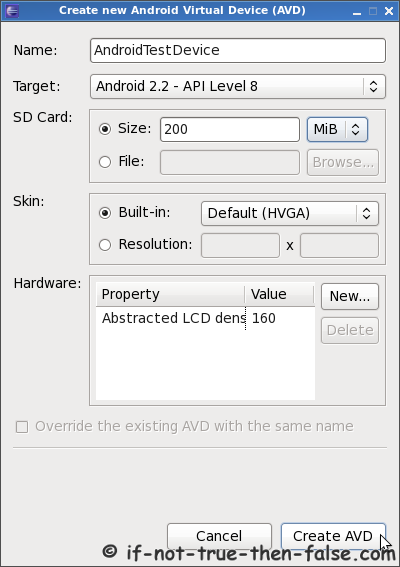
4.4 Add needed AVDs Android Virtual Devices
4.5 Test Android Virtual Device
Select Device and click Start…
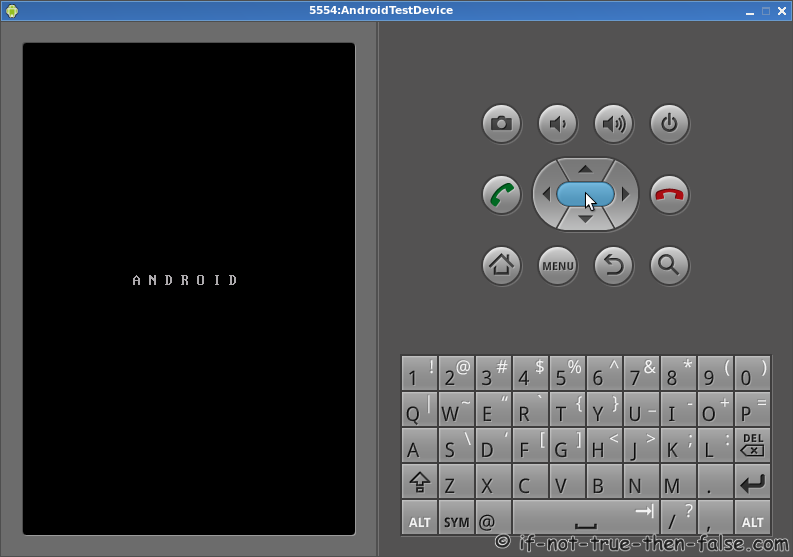
Starting device (this may take long time)
5. Create Simple Android Test Project
5.1 Create New Android Application
Click File -> New -> Project…
Select Android Project
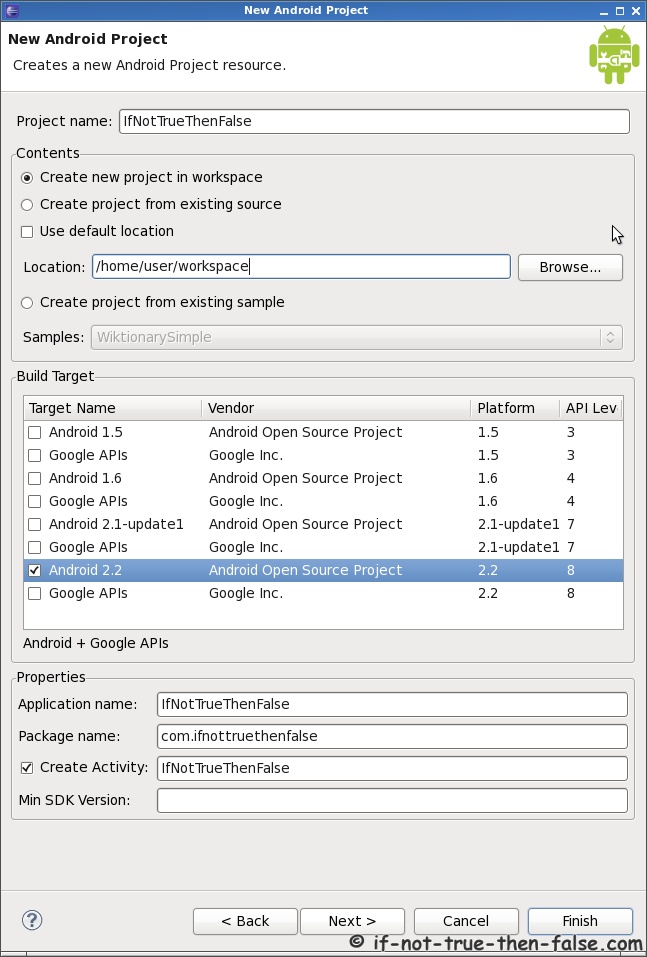
Add project information
5.2 Add source code for testing Android
Add and save following source code
package com.ifnottruethenfalse; import android.app.Activity; import android.os.Bundle; import android.widget.TextView; public class IfNotTrueThenFalse extends Activity { /** Called when the activity is first created. */ @Override public void onCreate(Bundle savedInstanceState) { super.onCreate(savedInstanceState); setContentView(R.layout.main); TextView tv = new TextView(this); tv.setText("This is simple test application!\nwww.if-not-true-then-false.com"); setContentView(tv); } } |
5.3 Run Android application
Click Run -> Run as -> Android Application
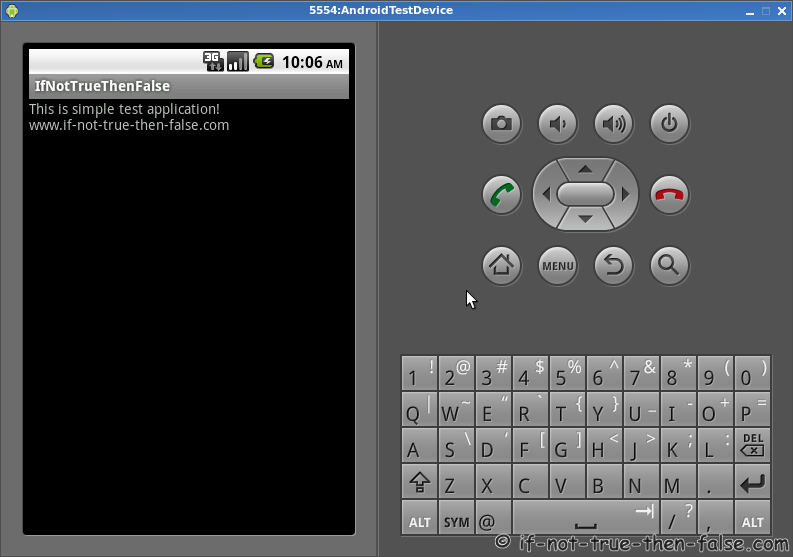
Test Android Application running
101 Comments
Leave a Comment
Trackbacks/Pingbacks
- android SDK r08 on CentOS 5.5 « Friendrons Blog - [...] http://www.if-not-true-then-false.com/2010/android-sdk-and-eclipse-adt-on-fedora-centos-red-hat-rhel... [...]
This is guide howto install Android SDK Tools r16 and Eclipse ADT (Android Development Tools) Plugin on Fedora 16, Fedora 15, Fedora 14, Fedora 13, CentOS 6.2/6.1/6 and Red Hat (RHEL) 6.2/6.1/6.


Great article, not knowing eclipse I was stuck at the Add Eclipse Helios repository step.
I think you missed a +R in “2.3 Add Write Permissions to /opt/android-sdk” ? Or use chown +R ?
Hi DAK,
Nice to hear that this was useful to you.
Yep, it was typo, I missed recursive for /opt/android-sdk directory. It’s corrected now. Thanks for correction!
Hi JR….
I have a problem and i dont known how to fix it……
I am thinking about..there are some more than ONE problem to fix…
The plataform…..Fedora 13 64 bits…..Eclipse Helios
in the preferenses->android….. in location text box…..i put the path of the Android SDK….but…
the IDE return me the following…
<>
Error Details: <>
thats is the first issue……..
then
in the standalone Android SDK and AVD maneger
-> Available Packages…in refresh…….i got:
<>
Thanks….From Resistencia, Chaco, ARGENTINA.
Hi JR….
I have a problem and i dont known how to fix it……
I am thinking about..there are some more than ONE problem to fix…
The plataform…..Fedora 13 64 bits…..Eclipse Helios
in the preferenses->android….. in location text box…..i put the path of the Android SDK….but…
the IDE return me the following…
‘Android SDK content loader’ has encountered a problem. parseSdkContent Failed
Error Details: parseSdkContent failed java.lang.NullPointerException
thats is the first issue……..
then
in the standalone Android SDK and AVD maneger
-> Available Packages…in refresh…….i got:
XML verification failed for http://dl-ssl.google.com/android/repository/repository.xml.
Error: java.lang.NullPointerException
Thanks….From Resistencia, Chaco, ARGENTINA.
Hi Mariano,
What permissions you have Android SDK directory?
Please post output of following command here:
What Android SDK version are you using?
ls -la /opt/android-sdk
total 24
drwxrwxrwx. 5 mrno mrno 4096 Aug 19 06:41 .
drwxr-xr-x. 4 root root 4096 Aug 19 13:14 ..
drwxrwxrwx. 2 mrno mrno 4096 May 7 18:45 add-ons
drwxrwxrwx. 2 mrno mrno 4096 May 7 18:45 platforms
-rw-rw-rw-. 1 mrno mrno 828 May 7 18:45 SDK Readme.txt
drwxrwxrwx. 3 mrno mrno 4096 Aug 19 06:41 tools
i downloaded the sdk (android-sdk_r06-linux_86) one week ago
Thanks!
Hi Mariano,
Your permissions looks ok.
What Java version are you using?
Try following to fix that standalone Android SDK and AVD maneger error:
Create file ~/.android/androidtool.cfg
with following content:
sdkman.force.http=trueAnd then start Android SDK and AVD maneger from command line.
Thanks for the tip on the 32-bit libraries! That was a big time-saver. Here’s another tip in case anyone has the same problem.
Everything seemed to install properly for me, but the emulator (virtual device) wouldn’t launch. There were no apparent errors, it just never showed the window when I clicked Start. I eventually saw these errors in /var/log/messages:
kernel: emulator[1454]: segfault at 1 ip 000000000094e987 sp 00000000ffba7638 error 4 in ld-2.12.so[937000+1e000]
abrt[1459]: saved core dump of pid 1454 (/stuff/projects/android/android-sdk-linux_86/tools/emulator) to /var/spool/abrt/ccpp-1282632703-1454.new/coredump (163823616 bytes)
abrtd: Directory ‘ccpp-1282632703-1454′ creation detected
abrtd: Executable ‘/stuff/projects/android/android-sdk-linux_86/tools/emulator’ doesn’t belong to any package
abrtd: Corrupted or bad crash /var/spool/abrt/ccpp-1282632703-1454 (res:4), deleting
It turned out to be an audio problem. The emulator was searching for any audio system it could use, but none were found, since it wanted a 32-bit one, and my system is 64-bit. I’m using ALSA, so I ran this command to fix it:
yum install alsa-lib.i686
If you’re not using alsa, run this command to see what the emulator supports:
cd tools
./emulator -help-audio-out
Hi Jason,
Nice to hear that this howto was useful to you.
And very nice tip, howto fix alsa sound problems on 64-bit system. This is certainly a useful tip to others who have the same problem. Thanks!
One more issue….
in the standalone Android SDK and AVD Manaeger–>Virtual Devices–> in the rigth panel…”no ADV available” in the target name colum and its alocate in the correct path ~/.android/avd
Hi mariano,
You have to first install Android Virtual Devices. Check “Available packages” tab and select at least one SDK. Example latest Android platform SDK Android Platfrom 2.2.
that is my second problem
in the standalone Android SDK and AVD maneger
-> Available Packages…in refresh…….i got:
XML verification failed for http://dl-ssl.google.com/android/repository/repository.xml.
Error: java.lang.NullPointerException
the same error over the Eclipse Helios…..
this is not the first time that I install the Android Development Platform. I’ve never faced any problem with Eclipe Galileo installation..
Hi mariano,
Please, check your Java JDK version with following commands:
java -versionand
javac -versionSolved!
I had to reinstall Java ……..
I had to upgrade to java 1.6…
before I had installed java 1.5
it seems strange to me that Fedora 13 has as default java 1.5
thanks!
Nice to hear that you got it working!
I have heard some problems with older Java versions…so that’s why I asked. :)
Hi Jr,
Thanks for the tips.
I got problem after installing ADT Plugin, I cant Configure Eclipse and Manage Android SDKs and Virtual Devices (AVD), when i go to Windows >> Preference, I didn’t see Android at the left panel. I don’t know what goes wrong.
Thanks
Deu
Hi deu,
Did you get any errors during ADT plugin installation?
And did you restarted Eclipse after ADT installation?
Jr,
The ADT Plugin installation run successfull without any error. Already restarted Eclipse, but still can’t see Android in the reference.
Try following (as root user):
Please post outputs here.
Here are the output:~
locate com.android:
locate com.android |grep jar |xargs ls -ls:
Everything looks ok, but some reason ADT Plugin it’s not working.
Next, I recommend to try uninstall ADT plugin -> restart Eclipse -> then reinstall ADT -> restart Eclipse.
If this does not help, then try to remove the ADT plugin -> start Eclipse as root user -> re-install the ADT plugin -> restart Eclipse as normal user.
Its works after i start eclipse as root user, I can install the plugin & can see Android in the Reference when start Eclipse as normal user. But I need to preceed with installation of all nedded SDKs as root user.
Thanks
I’ve heard previously about this problem, but I have never see this myself or find any decent explanation how this can occur…the ADT plugin installation is successful, but the Android stuff doesn’t show up.
But most importantly of course, that you got the ADT plugin work.
You’re welcome! :)
I had the same problem with Android not appearing, and installing as root solved it. Thanks!
Running current Gentoo with Galileo-r2 installed from the Eclipse site (had other issues with the package from Portage) if anyone cares enough to look into why this happens for some people.
I’ve this error on the command
run as...:ifNotTrueThenFalse does not specify a android.test.InstrumentationTestRunner instrumentation or does not declare uses-library android.test.runner in its AndroidManifest.xml
An idea ?
Thanks.
Hi cyrmeli,
Are you trying to run the entire project or just the .java file?
I have tried this example many times and it’s still working as it should.
I thought Helios is not recommended version? has the issue been fixed?
Hi tcmichals,
Yes you are right Eclipse 3.6 Helios is not recommended version, but I have not noticed any issues using Eclipse 3.6 and 3.6.1. Android SDK site recommend Eclipse 3.4 Ganymede and Eclipse 3.5 Galileo. So if you want play safe then it’s better install Eclipse 3.4 or 3.5.
Btw. this guide should works also with Eclipse 3.5 and Eclipse 3.4.
Thank you very much! Very neat tutorial – starting right from JDK till Android Test project. I couldn’t even get AVD running using my professor’s doc.
Thank you so much for this guide. !!
everythink work s as described under CentOS 5.5 also for android version 2.3, except for the emulator:
[2010-12-19 12:22:20 - Emulator] /opt/android-sdk/tools/emulator: /lib/libc.so.6: version `GLIBC_2.8′ not found (required by /opt/android-sdk/tools/emulator)
[2010-12-19 12:22:20 - Emulator] /opt/android-sdk/tools/emulator: /lib/libc.so.6: version `GLIBC_2.7′ not found (required by /opt/android-sdk/tools/emulator)
[2010-12-19 12:22:20 - Emulator] /opt/android-sdk/tools/emulator: /lib/libc.so.6: version `GLIBC_2.11′ not found (required by /opt/android-sdk/tools/emulator)
Hi ur,
This is new problem with CentOS 5.5 and Red Hat (RHEL) 5.5. It appears that the Android SDK’s one requirement is now Glibc 2.11 and CentOS 5.5 and Red Hat (RHEL) 5.5 uses Glibc 2.5.
This is one “hack” howto get it working with Android SDK r08:
Do you got it working with this or found any other problems?
Thanks very mutch for this article, i was having a bad time trying to making this work under fedora 14. Adding the Helios url and then updating fixed everything
/emulator: /lib/libc.so.6: version `GLIBC_2.8′ not found (required by ./emulator)
./emulator: /lib/libc.so.6: version `GLIBC_2.7′ not found (required by ./emulator)
./emulator: /lib/libc.so.6: version `GLIBC_2.11′ not found (required by ./emulator)
not runing emulator android
ugh busy??
Hi iyant,
I have solution this problem on my post.
Please read Install Android SDK section.
Excellent guide! :)
Hey. Like everyone else, I’m trying to install the Android SDK on my 64 bit Centos. When I get to step 4.1/4.2, I get an error saying “/android-sdk/platforms is missing” and “failed to get the required ADT number from the SDK” So I “ls” my android sdk directory and see I only have ‘tools”.
Was platforms and whatever else suppose to be downloaded in step 3.3 or was it suppose to have come out of the same zip file that the emulator did in 2.3? I notice that in step 2.3 the emulator is referenced specifically.
I did try uninstalling and reinstalling under root to see if that would fix it but to no avail. Any help would be appreciated. Thanks!
Hi Malfroy,
Sorry I forgot add CentOS on Android SDK download row…
You have to complete all following steps on 64 bit CentOS:
Got it working. Thanks for the clarificaiton!
thanks a lot …
Great article.
Just what I needed.
For anyone that sees this message
“Waiting for HOME (‘android.process.acore’) to be launched”
It does take an unfeasibly long time to run the emulator for the first time. Go make yourself a coffee and come back to it.
Great article! This was instrumental in helping me get the SDK installed back a few months ago.
New development – The latest Android SDK (r10) is available, and requires ant 1.8. Fedora 14 only offers ant 1.7, even in the third-party repositories. I’m stick at this very point right now :(
Hi Brad,
Nice to see you here and nice to hear that this was helpful to you. :)
And then your problem. I checked that stackoverflow discussion and yes you could install ant easily to /opt and change Eclipse settings. It should work, but another (more Fedora style) method is use yum package management system and Fedora rawhide repository.
Install rawhide repo:
yum install fedora-release-rawhideInstall / Update ant 1.7 to 1.8
Very good
Hi,
Thank you for your tutorial. I have a question about android application. Can I compile android application to run as desktop application. I mean, I wan to compile and running android application as my desktop application.
Thank you
Hi toto,
No you can’t, sorry.
You could run Android application just on Android platforms like:
- Phones
- Tablets
- Emulators
Thanks, your tutorial is by far the best ive stumbled across, and i learned a lot of linux stuff as well. Now if only someone could figure out the R file missing crap ive dealt with for a year id be in heaven =)
Hi Rayn,
Thanks for the compliments. :)
Could you explain in more detail what kind of problems that you have with R file? Have you tried clean your project (Project > Clean…)?
stuck at part install helios repository,everytime i input the address it gives an error..duplicate address…i have tried to remove all sites from preferences>>avilable softwares…and still gives an error,no software found at http://download.eclipse.org/releases/helios.for the record am using a proxy server.
what might be the problem?
thanks..
Hi maks,
Sometimes it works really slowly and need multiple reconnects. I have had same style issues sometimes. Please try to access download.eclipse.org/releases/helios with browser, is it working?
Thanks a lot for such a helpful article . I have been searching for
/opt/android-sdk/tools/emulator: /lib/libc.so.6: version `GLIBC_2.7′ not found (required by /opt/android-sdk/tools/emulator)
error everywhere.
Hello, I was trying to install the android SDK on a centOS 5.5 box and I succesfully installed but when I try to add for example the tools package that allows me to have gprs, touchscreen, gsm support I get a java Language null pointer exception and it disappears when I installed the android sdk tools revision 10, but this tools requires glibc 2.8++ which is impossible to install in this server… what should I do to have all emulator features of Tools rev 10 with the r07 emulator??
regards
UPDATE
There werer no issue, I just reinstalled the rev 10 tools and then I replace the emulator file with the r07version and it worked like a charm.
I was trying to create the Virtual Device, after I fill out all the option, I did click on Create AVD button and the console show to me this message
2011-06-12 20:43:12 - SDK Manager] Error: null
[2011-06-12 21:36:18 - SDK Manager] Failed to create the SD card.
[2011-06-12 21:36:18 - SDK Manager] Failed to create sdcard in the AVD folder.
and I cant create the device. What can I do to solve it?
Hi LostAcapulco,
Do you have write permissions on avd directory and enough free space for sdcard?
Is your system 32-bit or 64-bit?
Is 64bits, btw if I dont asign sd card and then I continued creating the Virtual Device, this can be created, but when I try to launch this message show to me. Failed to start emulator: Cannot run program “/opt/android-sdk//tools/emulator”: java.io.IOException: error=2, No such file or directory
About permissions I cant see the the adv directory where is it located?
Did you installed all 32-bit packages on your system (step 2.5)?
yum install glibc.i686 glibc-devel.i686 libstdc++.i686 zlib-devel.i686 ncurses-devel.i686 libX11-devel.i686 libXrender.i686 libXrandr.i686ADV directory is normally located ~/.android/avd.
By the way could you check your Android SDK location path, it should be /opt/android-sdk, not /opt/android-sdk/.
Btw. could you also post output of following command:
output comand:
ls -la /opt/android-sdk/tools/
total 10168
drwxrwxrwx. 5 12275 5000 4096 May 3 18:13 .
drwxrwxrwx. 10 12275 5000 4096 Jun 12 21:22 ..
-rw-rw-rw-. 1 12275 5000 323 May 3 18:13 adb_has_moved.txt
-rwxrwxrwx. 1 12275 5000 3443 May 3 18:13 android
drwxrwxrwx. 2 12275 5000 4096 May 3 18:13 ant
-rwxrwxrwx. 1 12275 5000 1977 May 3 18:13 apkbuilder
-rwxrwxrwx. 1 12275 5000 3179 May 3 18:13 ddms
-rwxrwxrwx. 1 12275 5000 86930 May 3 18:13 dmtracedump
-rwxrwxrwx. 1 12275 5000 1940 May 3 18:13 draw9patch
-rwxrwxrwx. 1 12275 5000 7748160 May 3 18:13 emulator
-rwxrwxrwx. 1 12275 5000 500976 May 3 18:13 etc1tool
-rwxrwxrwx. 1 12275 5000 3229 May 3 18:13 hierarchyviewer
-rwxrwxrwx. 1 12275 5000 22738 May 3 18:13 hprof-conv
-rwxrwxrwx. 1 12275 5000 1939 May 3 18:13 layoutopt
drwxrwxrwx. 5 12275 5000 4096 May 3 18:13 lib
-rwxrwxrwx. 1 12275 5000 17779 May 3 18:13 mksdcard
-rwxrwxrwx. 1 12275 5000 2262 May 3 18:13 monkeyrunner
-rw-rw-rw-. 1 12275 5000 206311 May 3 18:13 NOTICE.txt
drwxrwxrwx. 5 12275 5000 4096 May 3 18:13 proguard
-rw-rw-rw-. 1 12275 5000 65 May 3 18:13 source.properties
-rwxrwxrwx. 1 12275 5000 1549093 May 3 18:13 sqlite3
-rwxrwxrwx. 1 12275 5000 3044 May 3 18:13 traceview
-rwxrwxrwx. 1 12275 5000 198992 May 3 18:13 zipalign
executing installation package:
# yum install glibc.i686 glibc-devel.i686 libstdc++.i686 zlib-devel.i686 ncurses-devel.i686 libX11-devel.i686 libXrender.i686 libXrandr.i686
Loaded plugins: langpacks, presto, refresh-packagekit
adobe-linux-i386 | 951 B 00:00
adobe-linux-i386/primary | 12 kB 00:00
updates/metalink | 15 kB 00:00
adobe-linux-i386 18/18
Setting up Install Process
Resolving Dependencies
--> Running transaction check
---> Package glibc.i686 0:2.14-2 will be installed
--> Processing Dependency: glibc-common = 2.14-2 for package: glibc-2.14-2.i686
--> Processing Dependency: libfreebl3.so(NSSRAWHASH_3.12.3) for package: glibc-2.14-2.i686
--> Processing Dependency: libfreebl3.so for package: glibc-2.14-2.i686
---> Package glibc-devel.i686 0:2.14-2 will be installed
--> Processing Dependency: glibc-headers = 2.14-2 for package: glibc-devel-2.14-2.i686
---> Package libX11-devel.i686 0:1.4.3-1.fc15 will be installed
--> Processing Dependency: pkgconfig(xcb) >= 1.1.92 for package: libX11-devel-1.4.3-1.fc15.i686
--> Processing Dependency: pkgconfig(xcb) for package: libX11-devel-1.4.3-1.fc15.i686
--> Processing Dependency: pkgconfig(kbproto) for package: libX11-devel-1.4.3-1.fc15.i686
--> Processing Dependency: libX11.so.6 for package: libX11-devel-1.4.3-1.fc15.i686
--> Processing Dependency: pkgconfig(xproto) for package: libX11-devel-1.4.3-1.fc15.i686
--> Processing Dependency: libX11-xcb.so.1 for package: libX11-devel-1.4.3-1.fc15.i686
---> Package libXrandr.i686 0:1.3.1-2.fc15 will be installed
--> Processing Dependency: libXext.so.6 for package: libXrandr-1.3.1-2.fc15.i686
---> Package libXrender.i686 0:0.9.6-2.fc15 will be installed
---> Package libstdc++.i686 0:4.6.0-9.fc15 will be installed
--> Processing Dependency: libgcc_s.so.1(GCC_3.3) for package: libstdc++-4.6.0-9.fc15.i686
--> Processing Dependency: libgcc_s.so.1(GCC_3.0) for package: libstdc++-4.6.0-9.fc15.i686
--> Processing Dependency: libgcc_s.so.1(GCC_4.2.0) for package: libstdc++-4.6.0-9.fc15.i686
--> Processing Dependency: libgcc_s.so.1 for package: libstdc++-4.6.0-9.fc15.i686
--> Processing Dependency: libgcc_s.so.1(GLIBC_2.0) for package: libstdc++-4.6.0-9.fc15.i686
--> Processing Dependency: libgcc_s.so.1(GCC_3.3.1) for package: libstdc++-4.6.0-9.fc15.i686
---> Package ncurses-devel.i686 0:5.8-2.20110319.fc15 will be installed
--> Processing Dependency: libmenu.so.5 for package: ncurses-devel-5.8-2.20110319.fc15.i686
--> Processing Dependency: libmenuw.so.5 for package: ncurses-devel-5.8-2.20110319.fc15.i686
--> Processing Dependency: libtinfo.so.5 for package: ncurses-devel-5.8-2.20110319.fc15.i686
--> Processing Dependency: libpanelw.so.5 for package: ncurses-devel-5.8-2.20110319.fc15.i686
--> Processing Dependency: libpanel.so.5 for package: ncurses-devel-5.8-2.20110319.fc15.i686
--> Processing Dependency: libformw.so.5 for package: ncurses-devel-5.8-2.20110319.fc15.i686
--> Processing Dependency: libtic.so.5 for package: ncurses-devel-5.8-2.20110319.fc15.i686
--> Processing Dependency: libform.so.5 for package: ncurses-devel-5.8-2.20110319.fc15.i686
---> Package zlib-devel.i686 0:1.2.5-3.fc15 will be installed
--> Processing Dependency: libz.so.1 for package: zlib-devel-1.2.5-3.fc15.i686
--> Running transaction check
---> Package glibc-common.x86_64 0:2.13.90-9 will be updated
--> Processing Dependency: glibc-common = 2.13.90-9 for package: glibc-2.13.90-9.x86_64
---> Package glibc-common.x86_64 0:2.14-2 will be an update
---> Package glibc-headers.x86_64 0:2.13.90-9 will be updated
--> Processing Dependency: glibc-headers = 2.13.90-9 for package: glibc-devel-2.13.90-9.x86_64
---> Package glibc-headers.x86_64 0:2.14-2 will be an update
---> Package libX11.i686 0:1.4.3-1.fc15 will be installed
--> Processing Dependency: libxcb.so.1 for package: libX11-1.4.3-1.fc15.i686
---> Package libXext.i686 0:1.2.0-2.fc15 will be installed
---> Package libgcc.x86_64 0:4.6.0-7.fc15 will be updated
---> Package libgcc.i686 0:4.6.0-9.fc15 will be installed
---> Package libgcc.x86_64 0:4.6.0-9.fc15 will be an update
---> Package libxcb-devel.x86_64 0:1.7-2.fc15 will be installed
--> Processing Dependency: pkgconfig(xau) >= 0.99.2 for package: libxcb-devel-1.7-2.fc15.x86_64
---> Package ncurses-libs.i686 0:5.8-2.20110319.fc15 will be installed
---> Package nss-softokn-freebl.i686 0:3.12.10-1.fc15 will be installed
---> Package xorg-x11-proto-devel.noarch 0:7.6-8.fc15 will be installed
---> Package zlib.i686 0:1.2.5-3.fc15 will be installed
--> Running transaction check
---> Package glibc.x86_64 0:2.13.90-9 will be updated
---> Package glibc.x86_64 0:2.14-2 will be an update
---> Package glibc-devel.x86_64 0:2.13.90-9 will be updated
---> Package glibc-devel.x86_64 0:2.14-2 will be an update
---> Package libXau-devel.x86_64 0:1.0.6-2.fc15 will be installed
---> Package libxcb.i686 0:1.7-2.fc15 will be installed
--> Processing Dependency: libXau.so.6 for package: libxcb-1.7-2.fc15.i686
--> Running transaction check
---> Package libXau.i686 0:1.0.6-2.fc15 will be installed
--> Finished Dependency Resolution
Error: Protected multilib versions: libstdc++-4.6.0-9.fc15.i686 != libstdc++-4.6.0-7.fc15.x86_64
You could try using --skip-broken to work around the problem
You could try running: rpm -Va --nofiles --nodigest
how can I change the Android SDK location path?
Your /opt/android-sdk/tools directory looks good.
Do you have enabled Fedora 15 Updates repository?
You could change Android SDK location path here:
I guess is enable but Im not complety sure, How can I check it?
Simply list repos:
yum repolistThe emulator is already launched, thanks for all
Good to hear that you got it working! :)
how to ununstall ADT plugin
Hi sanam,
You could uninstall it with following method:
Open Help Menu >> Click About Eclipse SDK >> Click Installation Details >> Select Android stuff >> Click Uninstall…
When i add ADT Plugin in eclipse indigos , the problems is comes is shown below .
Cannot complete the install because one or more required items could not be found.
Software currently installed: Shared profile 1.0.0.1311331794947 (SharedProfile_epp.package.java 1.0.0.1311331794947)
Missing requirement: Shared profile 1.0.0.1311331794947 (SharedProfile_epp.package.java 1.0.0.1311331794947) requires ‘org.maven.ide.eclipse [1.0.0.20110607-2117]‘ but it could not be found.
–
i have found this error also in ubuntu-10.10 and ubuntu-10.04-LTS ,
can any one have the solution if this proble ,
please send me a mail on [email protected] ,
Thank You to ALL.
Hi Rahul,
This sounds some problem with permissions on your system and I think this error is not only related to ADT plugin? What happens if you try do installation as root?
hi ,
when i try to do this :
yum install glibc.i686 glibc-devel.i686 libstdc++.i686 zlib-devel.i686 ncurses-devel.i686 libX11-devel.i686 libXrender.i686 libXrandr.i686
I get this error:
No package glibc.i686 available.
No package glibc-devel.i686 available.
No package libstdc++.i686 available.
No package zlib-devel.i686 available.
No package ncurses-devel.i686 available.
No package libX11-devel.i686 available.
No package libXrender.i686 available.
No package libXrandr.i686 available.
Error: Nothing to do
I am using fedora 14
Hi Basmah,
Could you post output of following command:
yum repolistHelp me !
I have tried to install SDK during 3 days, but it always shows :
Failed to start emulator: Cannot run program “/opt/android-sdk//tools/emulator”: error=13, Permission denied
????
Thank you very much!
Oh, i succeed ! But, SDK don’t show when i start ! Help me !
emulator: emulator window was out of view and was recentred
emulator-arm: xcb_io.c:221: poll_for_event: Assertion `(((long) (event_sequence) – (long) (dpy->request)) <= 0)' failed.
Hi Trung,
Could you post your commands what you are trying to run?
Do you got that permission problem fixed?
Hi Mate,
Thanks for such a great post. its fool proof…i cant belive i managed to get all this done..
cheers for the help
regards
h
Hi!
When SDK started, it had showed :
[2011-08-10 20:57:09 - Evil] New emulator found: emulator-5554
[2011-08-10 20:57:09 - Evil] Waiting for HOME (‘android.process.acore’) to be launched…
[2011-08-10 20:59:14 - Evil] HOME is up on device ‘emulator-5554′
[2011-08-10 20:59:14 - Evil] Uploading Evil.apk onto device ‘emulator-5554′
[2011-08-10 20:59:18 - Evil] Installing Evil.apk…
[2011-08-10 21:01:00 - Evil] Success!
[2011-08-10 21:01:00 - Evil] Starting activity com.evil.EvilActivity on device emulator-5554
[2011-08-10 21:01:02 - Evil] ActivityManager: Starting: Intent { act=android.intent.action.MAIN cat=[android.intent.category.LAUNCHER] cmp=com.evil/.EvilActivity }
[2011-08-10 21:03:56 - Emulator] emulator-arm: xcb_io.c:221: poll_for_event: Assertion `(((long) (event_sequence) – (long) (dpy->request)) <= 0)' failed.
When i was dragging the mouse, it disappeared.
I can not run !
Please !
Hi Trung,
Are you trying to run emulator? Or where you get this error message?
Is it working with JRE7?
Hi lan,
I’m currently using Android SDK + ADT on Eclipse 3.7 with JDK 7 and have no problems with it.
thanks! :P
Failed to start emulator: Cannot run program “/opt/android-sdk//tools/emulator”: java.io.IOException: error=2, No such file or directory
i get this error
i tried every possible solution but nothing seems to work out
please help ..
please tell how to edit /etc/profile file ..
Use Eclipse Indigo to avoid errors.
Salvou minha vida, ja tinha instalao o centos 6 mais nada fazia o sdk do android funcionar direito!. Parabéns pelo post! Obrigado!
# For SDK version r_08 and higher, also add this for adb:
PATH=$PATH:/opt/android-sdk/platform-tools
export PATH
Hi Mitsklas,
Thanks! Added to guide too. :)
whenever i m trying to create a virtual device i m getting this erro :
/opt/android-sdk/tools/mksdcard: error while loading shared libraries: libstdc++.so.6: cannot open shared object file: No such file or directory
guys please help me……. thnks in advnc.. :)
Hi Arun,
Could you post output of following commands:
Hi JR, i am using Fedora 16 (64 bit) and logged in as ROOT .
also i have installed 64 bit dependencies using below command:
yum install glibc.i686 glibc-devel.i686 libstdc++.i686 zlib-devel.i686 ncurses-devel.i686 libX11-devel.i686 libXrender.i686 libXrandr.i686
Okay, thanks.
Your error message claims that the libstdc++.so.6 file does not found…
Could you post then output of following commands:
Hi JR, thank you for looking after my issue. please find the responses for the above commands.
[root@localhost ~]# rpm -qa libstdc++*
libstdc++-4.6.2-1.fc16.x86_64
[root@localhost ~]# ls -la /usr/lib/libstdc*
ls: cannot access /usr/lib/libstdc*: No such file or directory
[root@localhost ~]# ls -la /usr/lib64/libstdc*
lrwxrwxrwx. 1 root root 19 Feb 25 07:14 /usr/lib64/libstdc++.so.6 -> libstdc++.so.6.0.16
-rwxr-xr-x. 1 root root 994256 Oct 27 07:43 /usr/lib64/libstdc++.so.6.0.16
Hi again Arun,
Try to install 32-bit system packages again, because your system is really missing libstdc++.so.6 / libstdc++-4.6.3-2.fc16.i686.
yum install glibc.i686 glibc-devel.i686 libstdc++.i686 zlib-devel.i686 ncurses-devel.i686 libX11-devel.i686 libXrender.i686 libXrandr.i686Do you get 32-bit packages installed without any errors?
hello JR, sorry for d late and there is an error dat i have noticed:
Error: Protected multilib versions: libstdc++-4.6.3-2.fc16.i686 != libstdc++-4.6.2-1.fc16.x86_64
hello JR i have also tried to install the library from GUI add/remove programs but i m geting the same error:
Protected multilib versions: libstdc++-4.6.3-2.fc16.i686 != libstdc++-4.6.2-1.fc16.x86_64
Hello Arun,
Try following:
Is it working then?
hi JR me again… thanks a lot to you. now i am able to create the virtual device. You are really doing a great thing by sharing your knowledge. its really very helpfull for me and also for other developers out there.
thanks again. :)
Hi Arun,
You are welcome, nice to hear that you got it working…and thanks ;)
if they could make a tutorial to install android SDK and NetBeans 7.2 centos 6
in 2.4 How can do it I’m new in this
Hi raed,
Open /etc/profile or $HOME/.bash_profile file using text editor, example VI or nano. Then just paste needed rows and save file.
Hey,
FIRST THANK YOU FOR YOUR GREAT WORK HERE!!!!
Now, my problem:
During some days of working with fedora 17 (last updates) and eclipse + adt and jdk7
i have a freeze problem.
I `v tried some things like start as root user set the jvm memory
from 512 to 1024 via start propertys of eclipse and so on.
Now i`ve seen that the CPU usage of the java process goes very nearly to 100%.
Eclipse freeze and I have to restart eclipse. The OS and GNOME works.
Has someone the same problems? Or some Ideas what to do?
PS: dmesg and other logs show no error or warnings.
Thanks Thorty!
Hardware:
Intel Core 2 Extreme QX9300 (2,53 GHz)
4GB RAM
Geforce 9700M GT, 512 MB
(NVIDIA Driver installed)
I have a solution! Im so happy and its soooooo easy! After some coding and google I`ve found out that it has something to do with the Clipboard Function (Ctrl+C). You just have to navigate to Preferences – Keys. Search for the Shortcut Strg+Insert and Change this into Strg+C.
I`dont reallyBut now, Eclipse works very well.
Thanks, Thorty