Install Nginx/PHP-FPM on Fedora 16/15, CentOS/RHEL 6.2/5.7

nginx-logoI have once written Install nginx, PHP 5.3 and FastCGI on CentOS 5.5, Fedora 13, Red Hat RHEL 5.5/6 guide, but this guide is “updated” version, howto install Nginx with PHP 5.3.10 and PHP-FPM on Fedora 16/15/14, CentOS 6.2/6.1/6/5.7 and Red Hat (RHEL) 6.2/6.1/6/5.7. PHP-FPM is easier to use and configure than FastCGI and some tests says that PHP-FPM is even much more efficient than FastCGI.

Nginx (engine x) is a robust, small and high performance http server, reverse proxy server and also mail proxy server.

PHP-FPM (FastCGI Process Manager) is an alternative PHP FastCGI implementation with some additional features useful for sites of any size, especially busier sites.

Install Nginx, PHP 5.3.10 and PHP-FPM on Fedora 16/15/14, CentOS 6.2/6.1/6/5.7, Red Hat (RHEL) 6.2/6.1/6/5.7

1. Change to root user.

sudo -i
## OR ##
su -

2. Install needed repositories

Fedora 16/15/14 Remi repository

## Remi Dependency on Fedora 16, 15, 14
rpm -Uvh http://download1.rpmfusion.org/free/fedora/rpmfusion-free-release-stable.noarch.rpm 
rpm -Uvh http://download1.rpmfusion.org/nonfree/fedora/rpmfusion-nonfree-release-stable.noarch.rpm
 
## Fedora 16 ##
rpm -Uvh http://rpms.famillecollet.com/remi-release-16.rpm
 
## Fedora 15 ##
rpm -Uvh http://rpms.famillecollet.com/remi-release-15.rpm
 
## Fedora 14 ##
rpm -Uvh http://rpms.famillecollet.com/remi-release-14.rpm

CentOS 6.2/6.1/6/5.7 and Red Hat (RHEL) 6.2/6.1//6/5.7 Remi repository

## Remi Dependency on CentOS 6 and Red Hat (RHEL) 6 ##
rpm -Uvh http://download.fedora.redhat.com/pub/epel/6/i386/epel-release-6-5.noarch.rpm
 
## CentOS 6 and Red Hat (RHEL) 6 ##
rpm -Uvh http://rpms.famillecollet.com/enterprise/remi-release-6.rpm
 
 
## Remi Dependency on CentOS 5 and Red Hat (RHEL) 5 ##
rpm -Uvh http://download.fedora.redhat.com/pub/epel/5/i386/epel-release-5-4.noarch.rpm
 
## CentOS 5 and Red Hat (RHEL) 5 ## 
rpm -Uvh http://rpms.famillecollet.com/enterprise/remi-release-5.rpm

CentOS 6.2/6.1/6/5.7 and Red Hat (RHEL) 6.2/6.1/6/5.7 Nginx repository

Create file /etc/yum.repos.d/nginx.repo and add following content to repo file:
CentOS

[nginx]
name=nginx repo
baseurl=http://nginx.org/packages/centos/$releasever/$basearch/
gpgcheck=0
enabled=1

Red Hat (RHEL)

[nginx]
name=nginx repo
baseurl=http://nginx.org/packages/rhel/$releasever/$basearch/
gpgcheck=0
enabled=1

3. Install Nginx, PHP 5.3.10 and PHP-FPM

Fedora 16

yum install nginx php php-fpm php-common

Fedora 15/14, CentOS 6/5.7 and Red Hat (RHEL) 6.1/6/5.7

yum --enablerepo=remi install nginx php php-fpm php-common

4. Install PHP 5.3.10 modules

  • APC (php-pecl-apc) – APC caches and optimizes PHP intermediate code
  • CLI (php-cli) – Command-line interface for PHP
  • PEAR (php-pear) – PHP Extension and Application Repository framework
  • PDO (php-pdo) – A database access abstraction module for PHP applications
  • MySQL (php-mysql) – A module for PHP applications that use MySQL databases
  • PostgreSQL (php-pgsql) – A PostgreSQL database module for PHP
  • MongoDB (php-pecl-mongo) – PHP MongoDB database driver
  • SQLite (php-sqlite) – Extension for the SQLite V2 Embeddable SQL Database Engine
  • Memcache (php-pecl-memcache) – Extension to work with the Memcached caching daemon
  • Memcached (php-pecl-memcached) – Extension to work with the Memcached caching daemon
  • GD (php-gd) – A module for PHP applications for using the gd graphics library
  • XML (php-xml) – A module for PHP applications which use XML
  • MBString (php-mbstring) – A module for PHP applications which need multi-byte string handling
  • MCrypt (php-mcrypt) – Standard PHP module provides mcrypt library support

Select what you need: APC, CLI, PEAR, PDO, MySQL, PostgreSQL, MongoDB, SQLite, Memcache, Memcached, GD, MBString, MCrypt, XML

Fedora 16/15/14, CentOS 6.2/6.1/6/5.7 and Red Hat (RHEL) 6.2/6.1/6/5.7

yum --enablerepo=remi install php-pecl-apc php-cli php-pear php-pdo php-mysql php-pgsql php-pecl-mongo php-sqlite php-pecl-memcache php-pecl-memcached php-gd php-mbstring php-mcrypt php-xml

5. Stop httpd (Apache) server, Start Nginx HTTP server and PHP-FPM (FastCGI Process Manager)

Stop httpd (Apache)

/etc/init.d/httpd stop
## OR ##
service httpd stop

Start Nginx

/etc/init.d/nginx start ## use restart after update
## OR ##
service nginx start ## use restart after update

Start PHP-FPM

/etc/init.d/php-fpm start ## use restart after update
## OR ##
service php-fpm start ## use restart after update

6. Autostart Nginx and PHP-FPM on boot, also prevent httpd (Apache) autostarting on boot

Prevent httpd (Apache) autostarting on boot

chkconfig httpd off

Autostart Nginx on boot

chkconfig --add nginx
chkconfig --levels 235 nginx on

Autostart PHP-FPM on boot

chkconfig --add php-fpm
chkconfig --levels 235 php-fpm on

7. Configure Nginx and PHP-FPM

Create directory layout for your site

I use here testsite.local site, but this could of course be your real site, like www.if-not-true-then-false.com.

## public_html directory and logs directory ##
mkdir -p /srv/www/testsite.local/public_html
mkdir /srv/www/testsite.local/logs
chown -R nginx:nginx /srv/www/testsite.local

Alternative setup to add logs under /var/log directory.

## public_html directory and logs directory ##
mkdir -p /srv/www/testsite.local/public_html
mkdir -p /var/log/nginx/testsite.local
chown -R nginx:nginx /srv/www/testsite.local
chown -R nginx:nginx /var/log/nginx

Create and configure virtual host directories under /etc/nginx

mkdir /etc/nginx/sites-available
mkdir /etc/nginx/sites-enabled

Add following lines to /etc/nginx/nginx.conf file, after “include /etc/nginx/conf.d/*.conf” line (inside http block).

## Load virtual host conf files. ##
include /etc/nginx/sites-enabled/*;

Create testsite.local virtual host file

Add following content to /etc/nginx/sites-available/testsite.local file. This is very basic virtual host config.

server {
    server_name testsite.local;
    access_log /srv/www/testsite.local/logs/access.log;
    error_log /srv/www/testsite.local/logs/error.log;
    root /srv/www/testsite.local/public_html;
 
    location / {
        index index.html index.htm index.php;
    }
 
    location ~ \.php$ {
        include /etc/nginx/fastcgi_params;
        fastcgi_pass  127.0.0.1:9000;
        fastcgi_index index.php;
        fastcgi_param SCRIPT_FILENAME /srv/www/testsite.local/public_html$fastcgi_script_name;
    }
}

Link your virtual host to /etc/nginx/sites-enabled

cd /etc/nginx/sites-enabled/
ln -s /etc/nginx/sites-available/testsite.local
service nginx restart

Add your testsite.local “domain” to /etc/hosts file

/etc/hosts file Nginx on same machine
127.0.0.1 … row should look like example following:

127.0.0.1               localhost.localdomain localhost testsite.local

And if you use another machine where you are running your Nginx server, then add it’s public IP as following:

10.0.2.19               wordpress

Note: This is just very simple basic configuration, but if you want configure and optimize Nginx and PHP-FPM more then check following guide, Nginx and PHP-FPM Configuration and Optimizing Tips and Tricks

8. Test your Nginx and PHP-FPM setup

Create /srv/www/testsite.local/public_html/index.php file with following content:

<?php 
    phpinfo();
?>

Access following address, with your browser. http://testsite.local/
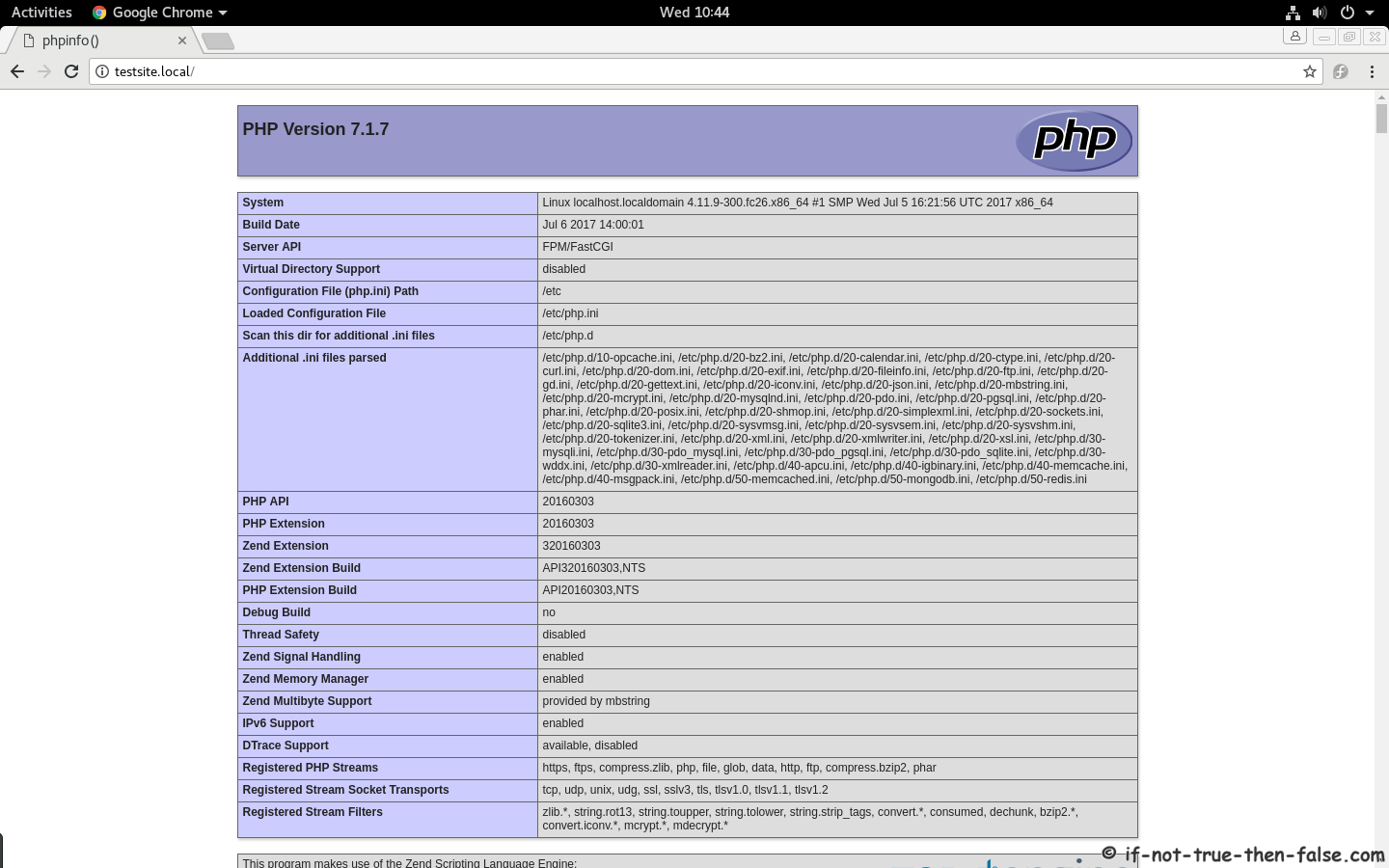
phpinfo with Nginx and PHP-FPM

Enable Remote Connection to Nginx Web Server (Open Port 80 on Iptables Firewall)

1. Edit /etc/sysconfig/iptables file:

nano -w /etc/sysconfig/iptables

2. Add following line before COMMIT:

-A INPUT -m state --state NEW -m tcp -p tcp --dport 80 -j ACCEPT

3. Restart Iptables Firewall:

service iptables restart
## OR ##
/etc/init.d/iptables restart

4. Test remote connection

Access following address, with your browser. http://your.domain/

Follow If Not True Then False Updates!
  1. LEMP on Fedora 16/15, CentOS/Red Hat (RHEL) 6.2/5.7 – (Linux, Nginx, MySQL, PHP)
  2. Install phpMyAdmin 3.4.9 on Fedora 16/15, CentOS/RHEL 6.2/5.7
  3. Install VirtualBox 4.1.8 on Fedora 16/15, CentOS/Red Hat (RHEL) 6.2/5.7
  4. Install MySQL 5.5.20 on Fedora 16/15, CentOS/Red Hat (RHEL) 6.2/5.7
  5. Install Apache/PHP 5.3.10 on Fedora 16/15, CentOS/Red Hat (RHEL) 6.2/5.7

54 Comments

  1. Hey, thank you for this clean tutorial.

    Just one little thing, don’t know why but in order to install php-fpm I had to use

    yum --enablerepo=remi install php-fpm

    • You are welcome! :)

      So you could not use following command?

      yum --enablerepo=remi install nginx php php-fpm php-common
  2. Thanks for your post. nginx fails to start after following the directions for fedora 16. this is what systemctl status says:

    Loaded: loaded (/etc/rc.d/init.d/nginx)
    Active: failed since Sat, 19 Nov 2011 09:02:52 -0700; 25s ago
    Process: 14752 ExecStart=/etc/rc.d/init.d/nginx start (code=exited, status=1/FAILURE)
    CGroup: name=systemd:/system/nginx.service

    I am new to this, do you have any suggestions for what to do to make it work?
    Thanks

    • Hi ebobo,

      Check your /var/log/messages log file:

      grep nginx /var/log/messages

      Do you see something like following:

      Nov 19 22:06:09 fedora nginx[17850]: Starting nginx: nginx: [emerg] bind() to 0.0.0.0:80 failed (98: Address already in use)
      Nov 19 22:06:10 fedora nginx[17850]: nginx: [emerg] bind() to 0.0.0.0:80 failed (98: Address already in use)
      Nov 19 22:06:10 fedora nginx[17850]: nginx: [emerg] bind() to 0.0.0.0:80 failed (98: Address already in use)
      Nov 19 22:06:11 fedora nginx[17850]: nginx: [emerg] bind() to 0.0.0.0:80 failed (98: Address already in use)
      Nov 19 22:06:11 fedora nginx[17850]: nginx: [emerg] bind() to 0.0.0.0:80 failed (98: Address already in use)
      Nov 19 22:06:12 fedora nginx[17850]: nginx: [emerg] still could not bind()
      Nov 19 22:06:12 fedora nginx[17850]: [FAILED]
      Nov 19 22:06:12 fedora systemd[1]: nginx.service: control process exited, code=exited status=1
      Nov 19 22:06:12 fedora systemd[1]: Unit nginx.service entered failed state.

      You maybe have httpd (apache) running and using port 80, stop it and try to start nginx again:

      systemctl stop httpd.service
       
      /etc/init.d/nginx start
      ## OR more fedora 16 way ##
      systemctl start nginx.service

      Then you can run following command to disable httpd (apache):

      systemctl disable httpd.service
      • That was the problem, thanks you!

  3. Hi JR, thanks for the great guide.

    In Step 5, should the Stop httpd (Apache) commands be ‘stop’ rather than ‘start’?

    /etc/init.d/httpd stop
    ## OR ##
    service httpd stop

    • Thanks Ben, yes stop it should be…it’s fixed now! :)

  4. Before doing these steps, I needed to run the following:

    yum -y update rpm

    To fix:
    error: Failed dependencies:
    rpmlib(FileDigests) <= 4.6.0-1 is needed by epel-release-6-5.noarch
    rpmlib(PayloadIsXz) <= 5.2-1 is needed by epel-release-6-5.noarch

    This allowed me to follow this tutorial.

    • Hi Josh,

      Thanks for this note. I normally assume that every users run up-to-date systems… :)

  5. Thanks for this tuts, I already set my server this way and all is just working, One problem persist is that after I install WordPress on it, when I try to add new themes on wp-content/themes/ directory manually, the themes doesn’t appears on the dashboard. And when I try to add it from upload menu, it doesn’t works either. Could you help me please :) Thanks a lot before.

    • Hi Tiyo,

      Could you post following output from your wp-content/ and wp-content/themes/ directory:

      ls -la wp-content/
       
      ## AND ##
       
      ls -la wp-content/themes/
       
      ## AND ##
       
      grep -e "user =" -e "group =" /etc/php-fpm.d/[your_wordpress_conf].conf
  6. Hi JR..
    In step 7, after run this command :
    cd /etc/nginx/sites-enabled/
    ln -s /etc/nginx/sites-available/testsite.local
    service nginx restart

    i got this error :
    [root@glenn etc]# /etc/init.d/nginx start
    Starting nginx (via systemctl): Job failed. See system logs and 'systemctl status' for details.
    [FAILED]

    here my log :
    [root@glenn etc]# grep nginx /var/log/messages
    Dec 12 15:22:01 glenn nginx[1130]: Starting nginx: nginx: [emerg] unknown directive "location" in /etc/nginx/nginx.conf:1
    Dec 12 15:22:01 glenn nginx[1130]: [FAILED]
    Dec 12 15:22:02 glenn systemd[1]: nginx.service: control process exited, code=exited status=1
    Dec 12 15:22:02 glenn systemd[1]: Unit nginx.service entered failed state.
    Dec 12 15:26:56 glenn nginx[1155]: Starting nginx: nginx: [emerg] unknown directive "location" in /etc/nginx/nginx.conf:1
    Dec 12 15:26:56 glenn nginx[1155]: [FAILED]
    Dec 12 15:26:56 glenn systemd[1]: nginx.service: control process exited, code=exited status=1
    Dec 12 15:26:56 glenn systemd[1]: Unit nginx.service entered failed state.
    Dec 12 15:35:40 glenn nginx[1129]: Starting nginx: nginx: [emerg] unknown directive "location" in /etc/nginx/nginx.conf:1
    Dec 12 15:35:40 glenn nginx[1129]: [FAILED]
    Dec 12 15:35:40 glenn systemd[1]: nginx.service: control process exited, code=exited status=1
    Dec 12 15:35:40 glenn systemd[1]: Unit nginx.service entered failed state.
    Dec 13 03:42:07 glenn nginx[1156]: Starting nginx: nginx: [emerg] unknown directive "location" in /etc/nginx/nginx.conf:1
    Dec 13 03:42:07 glenn nginx[1156]: [FAILED]
    Dec 13 03:42:07 glenn systemd[1]: nginx.service: control process exited, code=exited status=1
    Dec 13 03:42:07 glenn systemd[1]: Unit nginx.service entered failed state.
    Dec 13 03:45:39 glenn nginx[1130]: Starting nginx: nginx: [emerg] unknown directive "location" in /etc/nginx/nginx.conf:1
    Dec 13 03:45:39 glenn nginx[1130]: [FAILED]
    Dec 13 03:45:39 glenn systemd[1]: nginx.service: control process exited, code=exited status=1
    Dec 13 03:45:39 glenn systemd[1]: Unit nginx.service entered failed state.
    Dec 13 06:07:39 glenn nginx[1144]: Starting nginx: nginx: [emerg] unknown directive "location" in /etc/nginx/nginx.conf:1
    Dec 13 06:07:39 glenn nginx[1144]: [FAILED]
    Dec 13 06:07:39 glenn systemd[1]: nginx.service: control process exited, code=exited status=1
    Dec 13 06:07:39 glenn systemd[1]: Unit nginx.service entered failed state.
    Dec 13 06:13:51 glenn nginx[1205]: Starting nginx: nginx: [emerg] unknown directive "location" in /etc/nginx/nginx.conf:1
    Dec 13 06:13:51 glenn nginx[1205]: [FAILED]
    Dec 13 06:13:51 glenn systemd[1]: nginx.service: control process exited, code=exited status=1
    Dec 13 06:13:51 glenn systemd[1]: Unit nginx.service entered failed state.
    Dec 13 06:22:55 glenn nginx[1242]: Starting nginx: nginx: [emerg] unknown directive "location" in /etc/nginx/nginx.conf:1
    Dec 13 06:22:55 glenn nginx[1242]: [FAILED]
    Dec 13 06:22:55 glenn systemd[1]: nginx.service: control process exited, code=exited status=1
    Dec 13 06:22:55 glenn systemd[1]: Unit nginx.service entered failed state.
    Dec 15 02:36:45 glenn nginx[1149]: Starting nginx: nginx: [emerg] unknown directive "location" in /etc/nginx/nginx.conf:1
    Dec 15 02:36:45 glenn nginx[1149]: [FAILED]
    Dec 15 02:36:45 glenn systemd[1]: nginx.service: control process exited, code=exited status=1
    Dec 15 02:36:45 glenn systemd[1]: Unit nginx.service entered failed state.
    Dec 15 08:04:30 glenn nginx[1161]: Starting nginx: nginx: [emerg] unknown directive "location" in /etc/nginx/nginx.conf:1
    Dec 15 08:04:30 glenn nginx[1161]: [FAILED]
    Dec 15 08:04:30 glenn systemd[1]: nginx.service: control process exited, code=exited status=1
    Dec 15 08:04:30 glenn systemd[1]: Unit nginx.service entered failed state.
    Dec 15 08:48:58 glenn nginx[3408]: Starting nginx: nginx: [emerg] unknown directive "location" in /etc/nginx/nginx.conf:1
    Dec 15 08:48:58 glenn nginx[3408]: [FAILED]
    Dec 15 08:48:58 glenn systemd[1]: nginx.service: control process exited, code=exited status=1
    Dec 15 08:48:58 glenn systemd[1]: Unit nginx.service entered failed state.
    Dec 15 08:49:15 glenn nginx[3452]: Starting nginx: nginx: [emerg] unknown directive "location" in /etc/nginx/nginx.conf:1
    Dec 15 08:49:15 glenn nginx[3452]: [FAILED]
    Dec 15 08:49:15 glenn systemd[1]: nginx.service: control process exited, code=exited status=1
    Dec 15 08:49:15 glenn systemd[1]: Unit nginx.service entered failed state.
    Dec 15 08:50:16 glenn nginx[3485]: Starting nginx: nginx: [emerg] unknown directive "location" in /etc/nginx/nginx.conf:1
    Dec 15 08:50:16 glenn nginx[3485]: [FAILED]
    Dec 15 08:50:16 glenn systemd[1]: nginx.service: control process exited, code=exited status=1
    Dec 15 08:50:16 glenn systemd[1]: Unit nginx.service entered failed state.
    Dec 15 08:52:36 glenn nginx[3545]: Starting nginx: nginx: [emerg] unknown directive "location" in /etc/nginx/nginx.conf:1
    Dec 15 08:52:36 glenn nginx[3545]: [FAILED]
    Dec 15 08:52:36 glenn systemd[1]: nginx.service: control process exited, code=exited status=1
    Dec 15 08:52:36 glenn systemd[1]: Unit nginx.service entered failed state.
    Dec 15 08:54:19 glenn nginx[3588]: Starting nginx: nginx: [emerg] unknown directive "location" in /etc/nginx/nginx.conf:1
    Dec 15 08:54:19 glenn nginx[3588]: [FAILED]
    Dec 15 08:54:19 glenn systemd[1]: nginx.service: control process exited, code=exited status=1
    Dec 15 08:54:19 glenn systemd[1]: Unit nginx.service entered failed state.
    Dec 15 08:54:34 glenn nginx[3605]: Starting nginx: nginx: [emerg] unknown directive "location" in /etc/nginx/nginx.conf:1
    Dec 15 08:54:34 glenn nginx[3605]: [FAILED]
    Dec 15 08:54:34 glenn systemd[1]: nginx.service: control process exited, code=exited status=1
    Dec 15 08:54:34 glenn systemd[1]: Unit nginx.service entered failed state.
    Dec 15 08:54:43 glenn nginx[3623]: Starting nginx: nginx: [emerg] unknown directive "location" in /etc/nginx/nginx.conf:1
    Dec 15 08:54:43 glenn nginx[3623]: [FAILED]
    Dec 15 08:54:43 glenn systemd[1]: nginx.service: control process exited, code=exited status=1
    Dec 15 08:54:43 glenn systemd[1]: Unit nginx.service entered failed state.
    Dec 15 08:54:56 glenn nginx[3644]: Starting nginx: nginx: [emerg] unknown directive "location" in /etc/nginx/nginx.conf:1
    Dec 15 08:54:56 glenn nginx[3644]: [FAILED]
    Dec 15 08:54:56 glenn systemd[1]: nginx.service: control process exited, code=exited status=1
    Dec 15 08:54:56 glenn systemd[1]: Unit nginx.service entered failed state.

    So, how to solve it?
    Thx b4.. :)

    • Hi glenn,

      Could you post content of your /etc/nginx/nginx.conf file?

      • Here :
        location ~ \.php$ {
        root html;
        fastcgi_pass 127.0.0.1:9000;
        fastcgi_index index.php;
        fastcgi_param SCRIPT_FILENAME /usr/share/nginx/html$fastcgi_script_name;
        include fastcgi_params;
        }
        include /etc/nginx/conf.d/*.conf
        include /etc/nginx/sites-enabled/*;

        • Your /ect/nginx/nginx.conf config should example look like following:

          user              nginx;
          worker_processes  1;
          error_log  /var/log/nginx/error.log;
          pid        /var/run/nginx.pid;
           
          events {
              worker_connections  1024;
          }
           
          http {
              include       /etc/nginx/mime.types;
              default_type  application/octet-stream;
           
              log_format  main  '$remote_addr - $remote_user [$time_local] "$request" '
                                '$status $body_bytes_sent "$http_referer" '
                                '"$http_user_agent" "$http_x_forwarded_for"';
           
              access_log  /var/log/nginx/access.log  main;
              sendfile        on;
              keepalive_timeout  65;
           
              include /etc/nginx/conf.d/*.conf;
           
              include /etc/nginx/sites-enabled/*;
          }

          This is Fedora’s Nginx package example nginx.conf, without comment lines and include /etc/nginx/sites-enabled/*; added.

          Location block(s) should be always inside server block(s) and server block(s) should be always inside http block.

  7. Thanks for the help, and sorry for my long respond :)
    the first two commands, show that themes that I add recently is owned by root, so the problem is only on the permission?
    I new to this I’m not sure what to do, but I will try to use chmod if it is working.

    • Hi again Tiyo,

      Yes, your problem is directory permissions, and you can fix those with chmod command, but much better way is to use chown command and change your directories and files owner:group to same that PHP-FPM is using.

      More info about Nginx and PHP-FPM configuration you can find from Nginx and PHP-FPM Configuration and Optimizing Tips and Tricks

  8. Hi,

    Everything went well except that I can’t see the webpages (e.g. testsite.local) across the network. I’m running my web server from a virtual machine, if this would matter. Furthermore, I checked the logs and it doesn’t contain any error or access messages.

    Cheers

    • Hi Bar,

      Could you post output of following command from you host (where you try to load pages):

      cat /etc/hosts

      And output of following commands from your virtual machine:

      ifconfig
       
      iptables -L
      • cat /etc/hosts

        127.0.0.1 localhost localhost.localdomain testsite.local localhost4 localhost4.localdomain4
        ::1 localhost localhost.localdomain localhost6 localhost6.localdomain6

        ifconfig

        eth2 Link encap:Ethernet HWaddr 46:50:06:A0:A6:1A
        inet addr:172.16.9.17 Bcast:172.16.9.255 Mask:255.255.255.0
        inet6 addr: fe80::4450:6ff:fea0:a61a/64 Scope:Link
        UP BROADCAST RUNNING MULTICAST MTU:1500 Metric:1
        RX packets:141237 errors:0 dropped:0 overruns:0 frame:0
        TX packets:70011 errors:0 dropped:0 overruns:0 carrier:0
        collisions:0 txqueuelen:1000
        RX bytes:164894974 (157.2 MiB) TX bytes:4603652 (4.3 MiB)
        Interrupt:16

        lo Link encap:Local Loopback
        inet addr:127.0.0.1 Mask:255.0.0.0
        inet6 addr: ::1/128 Scope:Host
        UP LOOPBACK RUNNING MTU:16436 Metric:1
        RX packets:0 errors:0 dropped:0 overruns:0 frame:0
        TX packets:0 errors:0 dropped:0 overruns:0 carrier:0
        collisions:0 txqueuelen:0
        RX bytes:0 (0.0 b) TX bytes:0 (0.0 b)

        iptables -L

        Chain INPUT (policy ACCEPT)
        target prot opt source destination
        ACCEPT all -- anywhere anywhere state RELATED,ESTABLISHED
        ACCEPT icmp -- anywhere anywhere
        ACCEPT all -- anywhere anywhere
        ACCEPT tcp -- anywhere anywhere state NEW tcp dpt:ssh
        REJECT all -- anywhere anywhere reject-with icmp-host-prohibited
        ACCEPT tcp -- anywhere anywhere state NEW tcp dpt:http

        Chain FORWARD (policy ACCEPT)
        target prot opt source destination
        REJECT all -- anywhere anywhere reject-with icmp-host-prohibited

        Chain OUTPUT (policy ACCEPT)
        target prot opt source destination

        • Hi Bar,

          Looks almost right, your testsite.local on your /etc/hosts should point to your virtual machine ip, so remove testsite.local from first line and add following line:

          172.16.9.17 testsite.local

          Or what ever your virtual server ip is…if you reboot your virtual machine and if you use dhcp, then it might be something else than 172.16.9.17.

  9. i have same problem with Bar.

    The /etc/host file’s content is only this
    127.0.0.1 testsite.local

    but i run this code as root > cat /etc/hosts ## seems that
    127.0.0.1 localhost localhost.localdomain localhost4 localhost4.localdomain4
    ::1 localhost localhost.localdomain localhost6 localhost6.localdomain6

    i restart pc but it dont change. it is equal.

    Thanks RJ…

  10. i use Fedora 16, i run as root but this code don’t work
    chown -R nginx:nginx /srv/www/testsite.local

    it’s works. i apply this
    chmod -R 777 /srv/www/testsite.local

  11. Hi Sargin,

    /etc/host file should not even exist, it should be /etc/hosts. So add your

    127.0.0.1 testsite.local

    to /etc/hosts file!

    Could you tell more specific what is the problem with chown -R nginx:nginx /srv/www/testsite.local command?

    Btw. Good to remember that chmod 777 is very dangerous on public servers…everybody can read, write and execute everything…so never use it, in real life.

  12. domain name is sargin.domain i add sargin.domain to /etc/hosts

    at /etc/nginx/sites-available exist sargin.domain

    sargin.domain file content below:
    server {
    server_name sargin.domain;
    access_log /home/asus/NetBeansProjects/logs/access.log;
    error_log /home/asus/NetBeansProjects/logs/error.log;
    root /home/asus/NetBeansProjects;

    location / {
    index index.html index.htm index.php;
    }

    location ~ \.php$ {
    include /etc/nginx/fastcgi_params;
    fastcgi_pass 127.0.0.1:9000;
    fastcgi_index index.php;
    fastcgi_param SCRIPT_FILENAME /home/asus/NetBeansProjects$fastcgi_script_name;
    }
    }

    /etc/nginx/sited-enabled/ exist sargin.domain link

    when i go sargin.domain

    403 forbidden :(

    how can i solve__?

    • Hi sargin,

      Did you remember restart your Nginx server?

      /etc/init.d/nginx restart
      • yes i tried uubss but dont change. sargin.domain 403 Forbidden

        —-
        i make a sample different source
        /srv/www/sargin.host
        i add sargin.host to /etc/hosts.
        it works now.

        is home folders special folder so it give 403 forbidden message????

        • Do you have right permissions on your home folder?

          Please post output of following commands:

          ls -la /home/asus/
          ls -la /home/asus/NetBeansProjects
          ls -la /srv/www/
          • [root@asusFEDORA asus]# ls -la /home/asus/
            ls: /home/asus/.gvfs’e erişilemedi: Erişim engellendi
            toplam 196
            drwx——. 30 asus asus 4096 Ara 21 13:32 .
            drwxr-xr-x. 3 root root 4096 Ara 20 22:30 ..
            drwxrwxr-x. 2 asus asus 4096 Ara 20 22:31 .abrt
            -rw——-. 1 asus asus 112 Ara 21 13:17 .bash_history
            -rw-r–r–. 1 asus asus 18 Haz 22 17:38 .bash_logout
            -rw-r–r–. 1 asus asus 193 Haz 22 17:38 .bash_profile
            -rw-r–r–. 1 asus asus 124 Haz 22 17:38 .bashrc
            drwxr-xr-x. 2 asus asus 4096 Ara 20 22:31 Belgeler
            drwx——. 10 asus asus 4096 Ara 21 05:56 .cache
            drwx——. 14 asus asus 4096 Ara 21 13:36 .config
            drwx——. 3 asus asus 4096 Ara 20 22:31 .dbus
            -rw——-. 1 asus asus 16 Ara 20 22:31 .esd_auth
            drwxr-xr-x. 2 asus asus 4096 Ara 21 03:02 .fontconfig
            drwx——. 4 asus asus 4096 Ara 21 13:38 .gconf
            drwxr-xr-x. 2 asus asus 4096 Ara 20 22:31 Genel
            drwx——. 4 asus asus 4096 Ara 20 22:36 .gnome2
            -rw-r–r–. 1 asus asus 3072 Ara 21 06:28 .grl-bookmarks
            -rw-r–r–. 1 asus asus 2048 Ara 21 06:28 .grl-metadata-store
            -rw-r–r–. 1 asus asus 4096 Ara 21 06:28 .grl-podcasts
            drwxrwxr-x. 2 asus asus 4096 Ara 21 03:15 .gstreamer-0.10
            -rw-rw-r– 1 asus asus 146 Ara 21 07:57 .gtk-bookmarks
            d?????????? ? ? ? ? ? .gvfs
            -rw——-. 1 asus asus 2170 Ara 21 07:57 .ICEauthority
            -rw-r–r– 1 asus asus 3120 Ara 21 07:57 .imsettings.log
            drwxr-xr-x. 2 asus asus 4096 Ara 21 08:11 İndirilenler
            drwxr-xr-x. 3 asus asus 4096 Ara 20 22:31 .local
            drwxr-xr-x. 2 asus asus 4096 Ara 20 22:31 Masaüstü
            drwx——. 3 asus asus 4096 Ara 20 22:31 .mission-control
            drwxr-xr-x. 5 asus asus 4096 Ara 20 22:31 .mozilla
            drwxr-xr-x. 2 asus asus 4096 Ara 20 22:31 Müzik
            drwxrwxr-x 3 asus asus 4096 Ara 21 08:24 .netbeans
            drwxrwxr-x 3 asus asus 4096 Ara 21 09:06 .netbeans-derby
            drwxrwxr-x 4 nginx nginx 4096 Ara 21 11:31 NetBeansProjects
            drwxrwxr-x. 3 asus asus 4096 Ara 21 03:02 .openoffice.org
            drwx——. 2 asus asus 4096 Ara 20 22:31 .pulse
            -rw——-. 1 asus asus 256 Ara 20 22:31 .pulse-cookie
            drwxr-xr-x. 2 asus asus 4096 Ara 21 13:13 Resimler
            drwxrwxr-x 2 asus asus 4096 Ara 21 13:17 .shotwell
            drwxr-xr-x. 2 asus asus 4096 Ara 20 22:31 Şablonlar
            drwx——. 5 asus asus 4096 Ara 21 09:06 .thumbnails
            drwxr-xr-x. 2 asus asus 4096 Ara 20 22:31 Videolar
            drwxrwxr-x 4 asus asus 4096 Ara 21 12:58 www
            -rw——-. 1 asus asus 24083 Ara 21 13:44 .xsession-errors
            -rw-r–r–. 1 asus asus 658 Şub 8 2011 .zshrc
            **********************************************

            [root@asusFEDORA asus]# ls -la /home/asus/NetBeansProjects
            toplam 24
            drwxrwxr-x 4 nginx nginx 4096 Ara 21 11:31 .
            drwx——. 30 asus asus 4096 Ara 21 13:32 ..
            -rw-rw-r– 1 nginx nginx 10 Ara 21 11:31 index.php
            -rw-rw-r– 1 nginx nginx 11 Ara 21 11:23 index.php~
            drwxrwxr-x 2 nginx nginx 4096 Ara 21 09:15 logs
            drwxrwxr-x 3 nginx nginx 4096 Ara 21 09:51 PhpProject1
            ***************************************************

            [root@asusFEDORA asus]# ls -la /srv/www/
            toplam 16
            drwxr-xr-x 4 root root 4096 Ara 21 12:35 .
            drwxr-xr-x. 3 root root 4096 Ara 21 08:45 ..
            drwxr-xr-x 4 nginx nginx 4096 Ara 21 12:35 sargin.domain
            drwxrwxrwx 4 nginx nginx 4096 Ara 21 08:45 testsite.local

            • Thanks and sorry, but could you also post also following outputs:

              ls -la /
              ls -la /home
              • [root@asusFEDORA asus]# ls -la /
                toplam 188
                dr-xr-xr-x. 21 root root 4096 Ara 21 07:57 .
                dr-xr-xr-x. 21 root root 4096 Ara 21 07:57 ..
                -rw-r–r– 1 root root 0 Ara 21 07:57 .autorelabel
                dr-xr-xr-x. 2 root root 4096 Ara 21 03:48 bin
                dr-xr-xr-x. 4 root root 4096 Ara 21 00:28 boot
                drwxr-xr-x 21 root root 3800 Ara 21 13:41 dev
                drwxr-xr-x. 132 root root 12288 Ara 21 13:42 etc
                drwxr-xr-x. 3 root root 4096 Ara 20 22:30 home
                dr-xr-xr-x. 20 root root 12288 Ara 21 03:48 lib
                drwx——. 2 root root 16384 Ara 21 00:04 lost+found
                drwxr-xr-x 7 root root 140 Ara 21 13:32 media
                drwxr-xr-x. 2 root root 4096 Tem 29 11:49 mnt
                drwxr-xr-x. 4 root root 4096 Ara 21 06:11 opt
                dr-xr-xr-x 185 root root 0 Ara 21 09:57 proc
                -rw-r–r– 1 root root 86132 Ara 21 07:57 .readahead
                dr-xr-x—. 9 root root 4096 Ara 21 14:33 root
                drwxr-xr-x 35 root root 1220 Ara 21 13:42 run
                dr-xr-xr-x. 2 root root 12288 Ara 21 03:48 sbin
                drwxr-xr-x. 3 root root 4096 Ara 21 08:45 srv
                drwxr-xr-x 13 root root 0 Ara 21 09:57 sys
                drwxrwxrwt. 23 root root 4096 Ara 21 14:22 tmp
                drwxr-xr-x. 13 root root 4096 Ara 20 22:59 usr
                drwxr-xr-x. 18 root root 4096 Ara 21 00:26 var
                ********************************************************

                [root@asusFEDORA asus]# ls -la /home
                toplam 12
                drwxr-xr-x. 3 root root 4096 Ara 20 22:30 .
                dr-xr-xr-x. 21 root root 4096 Ara 21 07:57 ..
                drwx——. 30 asus asus 4096 Ara 21 13:32 asus

                thanks for answer RJ..

                • Thanks! :)

                  Try following (as root):

                  chmod 711 /home/asus
                   
                  /etc/init.d/nginx restart

                  Is it working then?

  13. Nice tutorial, i am noob in linux, is my first time in istall lemp on fedora 16…and this work without problems!

    Very tks

  14. Work like a charm, even for the first time (server name=blright.dev) it keep showing message that the root directory isn´t where it should be (/var/nginx/www). But after redo from step number 7 with new server name (kam.ty) all is well.

  15. Thanks a lot! After about 15 tutorials, I got that thing to work. Great tuto, no mistakes, all went OK !

  16. Thanks for your tutorial, but I have an error when I do this:

    yum --enablerep=remi install php-fpm
    Loaded plugins: fastestmirror
    Error getting repository data for remi, repository not found

    Could you tell me how to fix it?
    Thanks a lot!

  17. Hey JR!

    Great tutorial but I am still having issues with getting the site to display properly. At once point i was getting a 403, and that has since gone away and I only get a blank white page now.

    • Hi Hogie,

      Thanks! :)

      Could you check your error.log and access.log, do you find something suspicious? Or could you post your logs example to pastebin?

      • I had a look at /var/www/sites/mysite/logs and access.log has nothing, error.log only has “Worker connection is not enough”, but that has since been increased. That problem would result in the page timing out and when i increased them it turned to the white screen.

        I should mentioned i have virtualmin/webmin installed but am doing everything in terminal at the moment. Also, I am a linux NOOOOOOOOOOB so my conf files will be messy I am sure.

        I think I may have a issue with my virtual host as I am not sure if it should be in /etc/nginx/sites-enabled or in /etc/nginx/conf.d/. Also, I may have a issue because I am trying to test 2 sites, james.XXX.com and james2.XXX.com and I think they are either conflicting or I am not setting it up proper for a subdomain. james.XXX.com is basic HTML and works fine, james2.XXX.com is PHP and thats where I get my white screen.

        /var/log/nginx/error.log – http://pastebin.com/HiQfiAcK
        /var/log/nginx/access.log-20120131 (Lots more of this, only added the two different lines though) – http://pastebin.com/NKqdFpcs
        nginx conf – http://pastebin.com/JJpbBVrw

        Some strange things I noticed getting these logs for you. james2.XXX.com does not run any flash, and the logs show it is trying to find a flash file.

        • Yes, some problems with config files…your logs tell following:

          ...
          [error] 26499#0: *1 directory index of "/var/www/sites/james2.XXX.com/" is forbidden, client: XX.XX.40.188, server: james2.XXX.com, request: "GET / HTTP/1.1", host: "james2.XXX.com"
          ...
          [emerg] 27156#0: "server_name" directive is not allowed here in /etc/nginx/conf.d/james.XXX.com.conf:2
          ...

          Could you post all your config files and config file locations? Btw. do you have james2.XXX.com virtualhost config on nginx.conf file and another separated file?

          Could you also check/post php-fpm logs under /var/log/php-fpm/ path?

          • Yes *blush* I just noticed there is multiple virtualhosts, in fact 3 of them maybe. I deleted james2.xxx.com.conf from /eta/nginx/conf.d/ but still have it inside nginx.conf and sites-available (lm to sites-enabled)

            /etc/nginx/nginx.conf – http://pastebin.com/JJpbBVrw

            /etc/nginx/sites-enabled/james2.XXX.com.conf – http://pastebin.com/9hRrxXMm

            /var/log/php-fpm/error.log = http://pastebin.com/wxGX8Sph

            Strangely enough, I do not have a single virtual host for james.XXX.com and it works fine.

            • Currently I can only recommend you to setup both virtualhosts again, do clean setup (remove old virtualhosts and one from nginx.conf file), because you will later have huge problems if you have situation where you run multiple sites and you are not sure how or why your setup is working or not. Best setup is use separated files for virtualhosts, location is up to you, both sites-enabled and sites-available or conf.d works, or any other included path works, but just be sure that you know how your configuration files are organized and where they are located…or later you will have big big problems, if you have to change/update/modify configuration that works by chance.

              Easiest and best way to configure it is use multiple step process where you test your setup between those steps…you can example do following:

              1. Create one virtualhost, with plain html and test that it works
              2. Create another virtualhost and test that html works too and test also that the first virtual host works still
              3. Test PHP scripts
              4. …

              If you do this, then you know later where the problem is, just example if html works but PHP not, then you know that problem is between Nginx and PHP-FPM or PHP config, but not your basic Nginx config. And then all “debugging” is much easier. ;)

              Please let me know if you encounter some problems or do you got it working? :D

              • That worked perfectly! I removed the virtual host from my nginx.conf, added a new virtual host for james.XXX.com to sites-enabled and everything is working perfectly! Thanks so much for all your help. You are the first person able to explain how and where to put the virtual host and that it does not really matter where it is as long as you tell nginx where it is.

                A+ JR!

                • Excellent to hear that you got it working! :D Yes, virtual host files location does not really matter as long as you include those. :)

  18. Thank you for such a wonderful guide :) The only thing I couldn’t get working was the PHP-FPM, but a google solved that issue. Other than that, flawless!

    Thank you again :)

    • Hi Josh,

      You are welcome! Nice to hear that this guide was helpful, what kind of problems you had with PHP-FPM? If I setup PHP-FPM with this guide steps, it’s working normally… :)

  19. Hi there!

    I got problem with nginx. Its not installing. Problem in the Repository.

    yum --enablerepo=remi install nginx php php-fpm php-common
    Loaded plugins: refresh-packagekit, rhnplugin
    Repository google-chrome is listed more than once in the configuration
    This system is not registered with RHN.
    RHN support will be disabled.
    google-chrome | 951 B 00:00
    http://nginx.org/packages/rhel/6Server/i386/repodata/repomd.xml: [Errno 14] HTTP Error 404 : http://nginx.org/packages/rhel/6Server/i386/repodata/repomd.xml
    Trying other mirror.
    Error: Cannot retrieve repository metadata (repomd.xml) for repository: nginx. Please verify its path and try again

    • Hi

      Could you post output of following commands:

      uname -a
       
      lsb_release -a
       
      cat /etc/yum.repos.d/nginx.repo

Leave a Comment

Your email address will not be published. Required fields are marked *

*

You may use these HTML tags and attributes: <a href="" title=""> <abbr title=""> <acronym title=""> <b> <blockquote cite=""> <cite> <code> <del datetime=""> <em> <i> <q cite=""> <strike> <strong> <pre lang="" line="" escaped="" highlight="">

Trackbacks/Pingbacks

  1. Nginx and PHP-FPM Configuration and Optimizing Tips and Tricks - [...] wrote before a guide Howto install Nginx/PHP-FPM on Fedora 16/15, CentOS/RHEL 6.1/6/5.7, but this guide is just installation guide ...
Bear