Apache Userdir with SELinux on Fedora 18/17, CentOS/RHEL 6.4/5.9
This is quick guide howto enable Apache userdirs with SELinux on Fedora 18/17/16/15/14/13/12, CentOS 6.4/6.3/6.2/6.1/6/5.9 and Red Hat (RHEL) 6.4/6.3/6.2/6.1/6/5.9. This guide assumes that you have Apache (httpd) server installed on your system. This guide uses separeted userdir.conf without touching httpd.conf so later default httpd.conf can be overrided or whole configuration moved simply. This guide uses user called testuser and should be replaced by real user name(s).
Enable Apache Userdirs
1. Change root user
su - ## OR ## sudo -i |
2. Create /etc/httpd/conf.d/userdir.conf file
Open file, with our favorite editor, like:
nano -w /etc/httpd/conf.d/userdir.conf |
Add something like following content to file:
<IfModule mod_userdir.c> # # UserDir is disabled by default since it can confirm the presence # of a username on the system (depending on home directory # permissions). # UserDir enabled testuser # # To enable requests to /~user/ to serve the user's public_html # directory, remove the "UserDir disabled" line above, and uncomment # the following line instead: # UserDir public_html </IfModule> <Directory /home/*/public_html> Options Indexes Includes FollowSymLinks ## Apache 2.4 users use following ## Require all granted ## Apache 2.2 users use following ## AllowOverride All Allow from all Order deny,allow </Directory> |
And save file.
Note:
To allow a few users to have UserDir directories, but not anyone else, use the following:
UserDir disabled UserDir enabled testuser1 testuser2 testuser3 |
To allow most users to have UserDir directories, but deny this to a few, use the following:
UserDir enabled UserDir disabled testuser4 testuser5 testuser6 |
3. Start/Restart Apache (httpd)
## CentOS / RHEL ## /etc/init.d/httpd start ## OR ## /etc/init.d/httpd restart ## Fedora ## service httpd start ## OR ## service httpd restart |
4. Create public_html directory/directories
Make public_html directory/directories on user/users home dirs.
mkdir /home/testuser/public_html |
5. Change the correct permissions to home and public_html directories
## home directory ## chmod 711 /home/testuser ## public_html directory ## chown testuser:testuser /home/testuser/public_html chmod 755 /home/testuser/public_html |
6. Set proper SELinux settings for Apache homedirs (httpd_enable_homedirs)
setsebool -P httpd_enable_homedirs true |
Looks like older SELinux versions needs also following (example CentOS and Red Hat):
chcon -R -t httpd_sys_content_t /home/testuser/public_html |
Test Enabled Apache Userdir
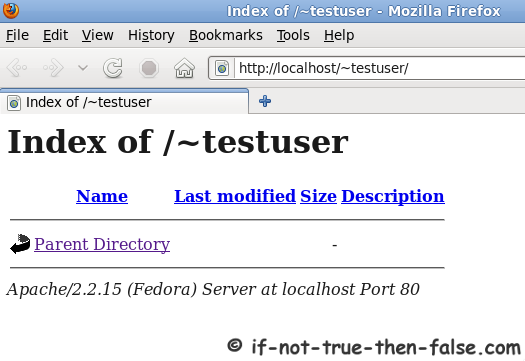
Go to url http://localhost/~testuser/
Should look something like following:
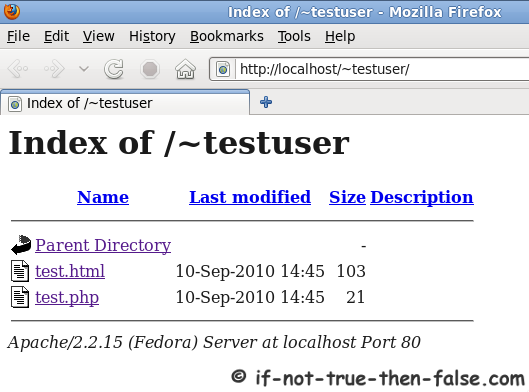
Test HTML and PHP under Apache Userdir
Create following files ~/public_html/test.html and ~/public_html/test.php
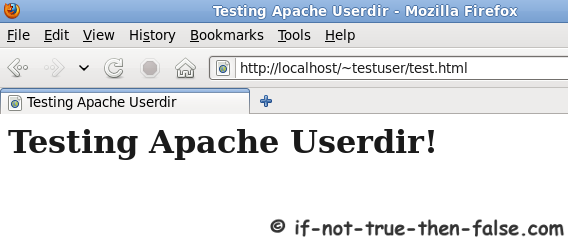
~/public_html/test.html content
<html> <head> <title>Testing Apache Userdir</title> </head> <body> <h1>Testing Apache Userdir!</h1> </body> </html> |
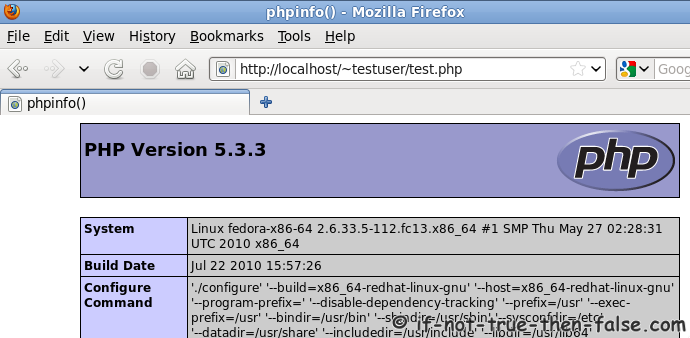
~/public_html/test.php content
<?php phpinfo(); ?> |
46 Comments
Leave a Comment
Trackbacks/Pingbacks
- Apache Userdir with SELinux on Fedora 13, CentOS 5.5, Red Hat … « apache - [...] Pełny artykuł na: Apache Userdir with SELinux on Fedora 13, CentOS 5.5, Red Hat … [...]
- Activar Apache Userdir para Fedora 15, Centos5.5 y Red Hat Linux 6 « The Beatech - [...] Fuente: if-not-true-then-false [...]
This is quick guide howto enable Apache userdirs with SELinux on Fedora 18/17/16/15/14/13/12, CentOS 6.4/6.3/6.2/6.1/6/5.9 and Red Hat (RHEL) 6.4/6.3/6.2/6.1/6/5.9. This guide assumes that you have 


Nice one, there are actually some good facts on this post many of my subscribers just might find this useful, I will send them a link, thank you
Works! Nice :)
I found out that if I set UseCanonicalName On in /etc/httpd/conf/httpd.conf – apache is changing localhost in the browser to the ServerName specified in httpd.conf and the pages in ~/public_html are not loading at all. So I set UseCanonicalName Off again :)
Best,
Jozsef
Or else,
It could be fixed in /etc/hosts by adding:
127.0.0.1 nameOFtheSERVER
:)
Best,
Jozsef
I follow your step html is working but php just show me blank screen.
Is there any light on how and why?
Best!
Fhon
Hi Fhon,
Is your PHP working on any other dir?
Is it working example on /var/www/html dir?
Hi JR,
Php is working on /var/www/html
but not /home/user/public_html
When try to access test.php file it just show download the file.
Run test.html work show the page without problem.
Best!
Fhon
Hi again Fhon,
A few additional questions.
What operating system (and version) are you using?
Did you execute following command?
Post following commands output:
Hello,
I have the same problem as Fhon
and here is my output for those commands:
userdir.conf didn’t exists because I enable the mod directly from httpd.conf, and here is the configuration for userdir:
AllowOverride All Options MultiViews Indexes FollowSymLinks Includes Order allow,deny Allow from alland here is output from ls command:
Is there something wrong with my configuration?
Hi Adods,
Is PHP working normally on /var/www/html directory?
Is HTML files working normally from user directory?
Could you post your full httpd.conf file and full path of your Apache userdir what you are using?
sed ‘/^ *#/d;s/#.*//’ /etc/httpd/conf.d/{php,userdir}.conf
LoadModule php5_module modules/libphp5.so
LoadModule php5_module modules/libphp5-zts.so
AddHandler php5-script .php
AddType text/html .php
DirectoryIndex index.php
UserDir enabled
UserDir public_html
Options Indexes Includes FollowSymLinks
AllowOverride All
Allow from all
Order deny,allow
ls -laZ ~/public_html/
drwxr-xr-x. brad brad unconfined_u:object_r:httpd_sys_content_t:s0 .
drwx--x--x. brad brad unconfined_u:object_r:user_home_dir_t:s0 ..
-rw-rw-r--. brad brad unconfined_u:object_r:httpd_sys_content_t:s0 index.html
-rw-rw-r--. brad brad unconfined_u:object_r:httpd_sys_content_t:s0 index.html~
-rw-rw-r--. brad brad unconfined_u:object_r:httpd_sys_content_t:s0 test.php
drwxrwxr-x. brad brad unconfined_u:object_r:httpd_sys_content_t:s0 thwart
Hi BT,
Thanks, do you have some problem with it?
was having issues, got it resolved. Not exactly sure how I fixed it, but its working now :) Thanks guys!
Excellent! :)
Great Tutorials, thanks you.
On Fedora 14 I had to :
setsebool -P httpd_read_user_content 1
Hi JR,
I’m running Fedora 14
I followed this tutorial to first install mysql, and then to install Apache (httpd) with php, the PHP test page creation succeed but not the last test remote connection.
And also while enabling Apache Userdir i couldn’t succeed and got this error in the browser: “Not Found
The requested URL /~testuser/ was not found on this server.
Apache/2.2.17 (Fedora) Server at localhost Port 80″
Please help i’m a new user.
Thanks!
Hi Doufanat,
What problems you have with remote connections? Do you opened iptables firewall port? Or are you behind some other firewall?
Do you actually have testuser with home dir on your Linux? Could you check your apache error_logs and post last errors here when you try to access testuser dir?
Hi,
I have some access problem
[root@Xia Xia]# chown testuser:testuser /home/testuser/public_html
chown: invalid user: `testuser:testuser’
[root@Xia Xia]# chmod 755 /home/tesuser/public_html
chmod: cannot access `/home/tesuser/public_html’: No such file or directory
[root@Xia Xia]#
Need help please
Hi,
So it looks like, that you don’t have testuser. I used this testuser just an example here…so if your username is example doufanat then you should use doufanat instead of testuser.
Hi JR
Thanks a lot, I’ve finished enabling Apache userdirs and it succeed, but the problem with the test remote connection till remain.
How to check my Apache error_logs? how to check either the port is open or not.
Best
Hi Doufanat,
Actually you don’t need Apache error_logs anymore if yoy get userdirs working… :)
First check, you could run following command:
iptables -LThen next thing is ensure that you have own and public ip address?
Hi JR
This is result of iptables -L
[root@Xia Xia]# iptables -L
Chain INPUT (policy ACCEPT)
target prot opt source destination
ACCEPT all — anywhere anywhere state RELATED,ESTABLISHED
ACCEPT icmp — anywhere anywhere
ACCEPT all — anywhere anywhere
ACCEPT tcp — anywhere anywhere state NEW tcp dpt:ssh
ACCEPT tcp — anywhere anywhere state NEW tcp dpt:http
REJECT all — anywhere anywhere reject-with icmp-host-prohibited
Chain FORWARD (policy ACCEPT)
target prot opt source destination
REJECT all — anywhere anywhere reject-with icmp-host-prohibited
Chain OUTPUT (policy ACCEPT)
target prot opt source destination
[root@Xia Xia]#
Do I need
You iptables rules looks good, but then next thing is have public ip, if you want open your server to whole world or lan ip, if you want open your server locally?
FYI, in my case, I had to modify the UserDir settings I found in /etc/httpd/conf/httpd.conf. Following your instructions and creating a userdir.conf file was overriden by the defaults in httpd.conf.
Thank you for your tutorial, I couldn’ find much out explaining how to do this. Right now I am having this problem after running the command
setsebool -P httpd_enable_homedirs true
I get
“-bash: setsebool: command not found”
I am running Centos 6.0, what could be causing the issue?
Thanks
Hi Nicholas,
Could you post output of following commands:
CentOS 6.0 should not be a problem…
I keep getting a 403 Forbidden saying I don’t have permission to access this…can you help me?
Hi Alice,
What system you are running?
Could you post output of following commands:
Hi, followed your instructions, but when I go to localhost/~testuser (or in my case localhost/~elijah) I just get a not found page:
Not Found
The requested URL /~elijah was not found on this server.
Apache/2.2.22 (Fedora) Server at localhost Port 80
I have the same problem as you. Everything else has worked fine so far. PHP and Apache itself seem fine. I can access the php test page from other computers on my local network but when I go to localhost/~testuser (localhost/~rick) I get the same thing.
Not really sure where to start looking to fix this.
I got no errors on anything in the setup process.
Well I seem to have found my problem.
Double check to make sure your settings in the userdir section of your httpd.conf file are correct.
Great guides by the way. Very clear and easy to follow.
Dear JR,
Your guides save me a lot of time. Thank you very much.
I’m following your guide to set up WordPress on my laptop with Fedora 16.
In Step 6 of this post (‘Apache Userdir with SELinux’), i got an error:
setsebool -P httpd_enable_homedirs true
libsemanage.semanage_get_lock: Could not get direct transaction lock at /etc/selinux/targeted/modules/semanage.trans.LOCK. (Resource temporarily unavailable).
Could not change policy booleans
This may results that http://localhost/~testuser/ is ‘Not Found’.
Could you help me to deal with this error or should i just skip it if i could setup WordPress anyway?
Best Regards
Yi
This article was a tremendous help!! After spending about 4 hours trying to get Fedora 16 php set up to work, I found this article and resolved my issues. Many, many thanks!!
I’ve read and follow the all tutorial step from step and get a 404 Error every time I want to access a user dir. I created three users: guillermo, reynierpm and tomas and inside each home create a directory public_html, set the proper permissions and run the commands one by one but didn’t know why isn’t working. The ouput of command running above by others is this:
[root@devserver ~]# sed ‘/^ *#/d;s/#.*//’ /etc/httpd/conf.d/{php,userdir}.conf
LoadModule php5_module modules/libphp5.so
LoadModule php5_module modules/libphp5-zts.so
AddHandler php5-script .php
AddType text/html .php
DirectoryIndex index.php
UserDir enabled guillermo reynierpm tomas
Options Indexes Includes FollowSymLinks
AllowOverride All
Allow from all
Order deny,allow
Any help?
Cheers and thanks in advance
Hi,
Could you tell your Linux distro?
Do you get any SELinux errors, when you try to access userdir?
Could you post output of following commands:
nevermind was my bad, I miss the parameter “UserDir public_html” under IfModule directive. Also I notice that I can write the same in two flavours, one is the suggested by you in the post and the second one is what I’m using right now ins including the directive Directory inside the IfModule so my userdir.conf is as follow:
UserDir enabled testuser
UserDir public_html
Options Indexes Includes FollowSymLinks
AllowOverride All
Allow from all
Order deny,allow
Cheers and thanks for your time
hi, i can’t access dir in my root direcotory..
i follow all tutorial in this web, but i have problem..
when i using this CLI
chcon -R -t httpd_sys_content_t /home/testuser/public_htmlmy OS show message
ls: cannot access /root/public_html/: No such file or directoryand when i using
chcon -R -t httpd_sys_content_t /home/thinkger/public_html/my system show message :
chcon: can’t apply partial context to unlabeled file
please help me, i’am sory if my english is bad. i’am from Indoneisa :D
I have tried everything and I am getting Forbidden 403: You don’t have permission to access /~testfolder/ on this server.
I have tried everything. This worked when I was using Fedora17, but I did a clean install of F18, and this is driving me crazy… I ALREADY CHANGED PERMISSIONS wtf…. so frustrating…
[brad@localhost public_html]$ ls -la /hometotal 28
drwxr-xr-x. 4 root root 4096 Mar 28 08:38 .
dr-xr-xr-x. 18 root root 4096 Mar 30 11:57 ..
drwx--x--x. 19 brad brad 4096 Mar 30 11:58 brad
drwx------. 2 root root 16384 Mar 28 08:21 lost+found
[brad@localhost public_html]$ ls -la ~/ |grep public_htmldrwx--x--x. 3 brad brad 4096 Mar 30 11:58 public_html
[brad@localhost public_html]$ ls -laZ ~/public_html/drwx--x--x. brad brad unconfined_u:object_r:httpd_sys_content_t:s0 .
drwx--x--x. brad brad unconfined_u:object_r:user_home_dir_t:s0 ..
drwxr-xr-x. brad brad unconfined_u:object_r:httpd_sys_content_t:s0 cryptothawte
-rwxr-xr-x. brad brad unconfined_u:object_r:httpd_sys_content_t:s0 test.html
This is where it works, in the default directories (/var/www/html)
[brad@localhost html]$ ls -la /var/www
total 16
drwxr-xr-x. 4 root root 4096 Mar 30 10:08 .
drwxr-xr-x. 21 root root 4096 Mar 30 10:08 ..
drwxr-xr-x. 2 root root 4096 Jan 8 05:47 cgi-bin
drwxr-xr-x. 2 root root 4096 Mar 30 10:10 html
[brad@localhost html]$ ls -la /var/www | grep html
drwxr-xr-x. 2 root root 4096 Mar 30 10:10 html
[brad@localhost html]$ ls -laZ /var/www/html/
drwxr-xr-x. root root system_u:object_r:httpd_sys_content_t:s0 .
drwxr-xr-x. root root system_u:object_r:httpd_sys_content_t:s0 ..
-rw-r--r--. root root unconfined_u:object_r:httpd_sys_content_t:s0 test.php
Hi B,
Sorry it take a while to check this. I updated this configuration working better with Apache 2.4, so try following config instead:
Then restart Apache and try again. Is it working then?
Is there a way to configure the apache server to be accessed as http://testuser.localhost, or in the case I have changed my ‘hosts’ file to access apache server as project.net, so developers can access like http://testuser.project.net/
Please help…
Hi Xavier,
Yes this is possible, you can just set that address to /etc/hosts file (pointing to right ip address) and add same address to your apache virtual host, like following:
Ok, then I have to setup a virtual for each user? Is there a way to setup apache to read the testuser in the url and redirect it to his specific userdir, so when a testuser02 is created his url http://testuser02.project.net is automatically redirected to his own userdir?
Hi Xavier,
You can do this first catching all subdomains with your virtual host, like:
Then create .htaccess with something like following content:
Another way is setup virtual hosts for each user, example using some simple bash script, which create folders and virtual host files.
I got everything working I just can’t get it to abide by my modrewrite rules set by the .htacess file, this is my userdir.conf
# All users
UserDir public_html
Options Indexes Includes FollowSymLinks
Require all granted
Hi Matthew,
Simply add AllowOverride FileInfo line to your userdir.conf:
And then restart apache: