Install SVN (Subversion) Server on Fedora 18/17, CentOS/Red Hat (RHEL) 6.4/5.9
This is guide, howto install SVN (Subversion) server on Fedora 18/17/16/15/14, CentOS 6.4/6.3/6.2/6.1/6/5.9, Red Hat (RHEL) 6.4/6.3/6.2/6.1/6/5.9.
What is SVN (Subversion)?
Subversion is a free/open-source version control system. Subversion manages files and directories, and the changes made to them, over time. This allows you to recover older versions of your data, or examine the history of how your data changed. In this regard, many people think of a version control system as a sort of “time machine”.
Install SVN (Subversion) Server on Fedora 18/17/16/15/14, CentOS 6.4/6.3/6.2/6.1/6/5.9, Red Hat (RHEL) 6.4/6.3/6.2/6.1/6/5.9
1. Change root user
su - ## OR ## sudo -i |
2. Install needed packages (mod_dav_svn and subversion)
yum install mod_dav_svn subversion |
Note: If you don’t have Apache installed already, this command installs it also. Read more about installing Apache and PHP >>
3. Modify Subversion config file /etc/httpd/conf.d/subversion.conf
Add following config to /etc/httpd/conf.d/subversion.conf file:
LoadModule dav_svn_module modules/mod_dav_svn.so LoadModule authz_svn_module modules/mod_authz_svn.so <Location /svn> DAV svn SVNParentPath /var/www/svn AuthType Basic AuthName "Subversion repositories" AuthUserFile /etc/svn-auth-users Require valid-user </Location> |
Read more SVN Access Control >>
4. Add SVN (Subversion) users
Use following command:
## Create testuser ## htpasswd -cm /etc/svn-auth-users testuser New password: Re-type new password: Adding password for user testuser ## Create testuser2 ## htpasswd -m /etc/svn-auth-users testuser2 New password: Re-type new password: Adding password for user testuser2 |
Note: Use exactly same file and path name as used on subversion.conf file. This example use /etc/svn-auth-users file.
Read more SVN Access Control >>
5. Create and configure SVN repository
mkdir /var/www/svn cd /var/www/svn svnadmin create testrepo chown -R apache.apache testrepo ## If you have SELinux enabled (you can check it with "sestatus" command) ## ## then change SELinux security context with chcon command ## chcon -R -t httpd_sys_content_t /var/www/svn/testrepo ## Following enables commits over http ## chcon -R -t httpd_sys_rw_content_t /var/www/svn/testrepo |
Restart Apache:
/etc/init.d/httpd restart ## OR ## service httpd restart |
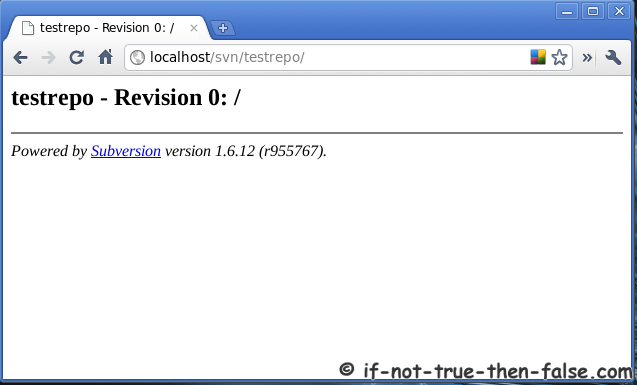
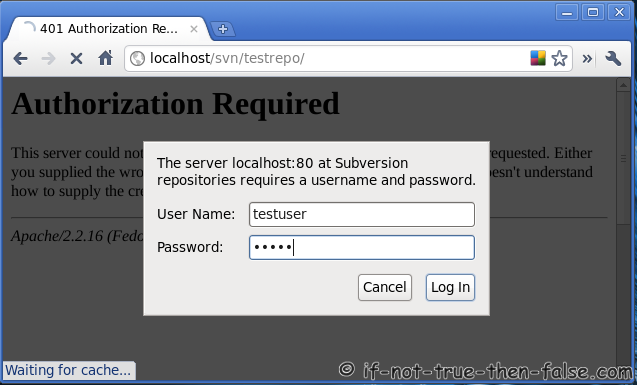
Goto http://localhost/svn/testrepo address and you should see something like following, write username and password:
6. Configure repository
To disable anonymous access and enable access control add following rows to testrepo/conf/svnserve.conf file:
## Disable anonymous access ## anon-access = none ## Enable access control ## authz-db = authz |
7. Create trunk, branches and tags structure under testrepo
Create “template” directories with following command:
mkdir -p /tmp/svn-structure-template/{trunk,branches,tags} |
Then import template to project repository using “svn import” command:
svn import -m 'Initial import' /tmp/svn-structure-template/ http://localhost/svn/testrepo/ Adding /tmp/svn-structure-template/trunk Adding /tmp/svn-structure-template/branches Adding /tmp/svn-structure-template/tags Committed revision 1. |
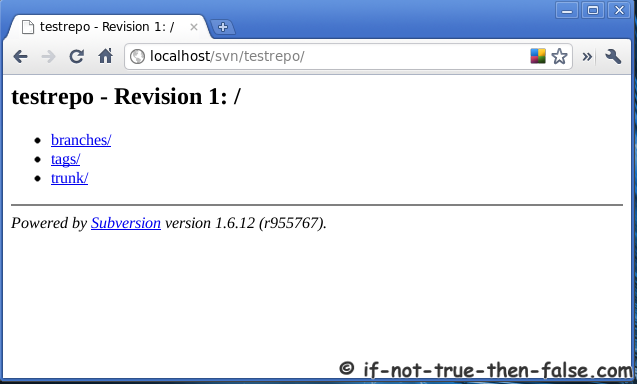
Check results on browser and see testrepo revision 1:
Remember also take regular backups. Here is guide howto backup and restore SVN (Subversion) Repositories.
Our forums user Will have also written guide, howto to install and configure SVN (Subversion). This is little bit different method.
246 Comments
Leave a Comment
Trackbacks/Pingbacks
- Install SVN Server on Fedora 13/14, CentOS/Red Hat (RHEL) 5.5/6 « svn - [...] Więcej: Install SVN Server on Fedora 13/14, CentOS/Red Hat (RHEL) 5.5/6 [...]
- Install SVN (Subversion) Server on Fedora 15/14, CentOS/Red Hat (RHEL) 5.6/6 | 資訊與工作 - [...] Install SVN (Subversion) Server on Fedora 15/14, CentOS/Red Hat (RHEL) 5.6/6 Install SVN (Subversion) Server on Fedora 15/14, CentOS/Red ...
This is guide, howto install SVN (Subversion) server on Fedora 18/17/16/15/14, CentOS 6.4/6.3/6.2/6.1/6/5.9, Red Hat (RHEL) 6.4/6.3/6.2/6.1/6/5.9.


i am not able to browse more than one svn repository. i have configured svn with ldap (active directory) authentication but not able to more than one repos. i have checked my httpd.conf, subversion.conf, and every repos have same configuration file one is opened fine with username & passwd of active directory user. another repos gave the error ….
Not Found
The requested URL /1000 was not found on this server.
Apache/2.2.3 (CentOS) Server at 10.0.0.108 Port 80
i am not able to browse more than one svn repository. i have configured svn with ldap (active directory) authentication but not able to more than one repos. i have checked my httpd.conf, subversion.conf, and every repos have same configuration file one is opened fine with username & passwd of active directory user. another repos gave the error ….
Not Found
The requested URL /1000 was not found on this server.
Apache/2.2.3 (CentOS) Server at 10.0.0.108 Port 80
Hi,
Getting Conflict error message while trying to commit a file from different PCs and logged in as different Users. Please help to resolve the issue.
Hi Kiran,
Could you post full error message and your svn configuration?
first check the permission.. what permission the user have.. than after check the same file or folder is there already exists…
i did easyapache update to dav,installed subversion via yum but when installing mod_dav_svn i get this:
root@alpha [~]# yum install mod_dav_svn
Loaded plugins: rhnplugin
Setting up Install Process
Resolving Dependencies
–> Running transaction check
—> Package mod_dav_svn.x86_64 0:1.6.11-2.el6.4 will be installed
–> Processing Dependency: httpd-mmn = 20051115 for package: mod_dav_svn-1.6.11-2.el6.4.x86_64
–> Finished Dependency Resolution
Error: Package: mod_dav_svn-1.6.11-2.el6.4.x86_64 (cloudlinux-x86_64-server-6)
Requires: httpd-mmn = 20051115
You could try using –skip-broken to work around the problem
** Found 5 pre-existing rpmdb problem(s), ‘yum check’ output follows:
bandmin-1.6.1-5.noarch has missing requires of perl(bandmin.conf)
bandmin-1.6.1-5.noarch has missing requires of perl(bmversion.pl)
bandmin-1.6.1-5.noarch has missing requires of perl(services.conf)
exim-4.77-1.x86_64 has missing requires of perl(SafeFile)
frontpage-2002-SR1.2.i386 has missing requires of libexpat.so.0
it is apache 2.2.22 cpanel with centos 6.2×64
Hi Maroje,
Could you please post output of following commands:
The same problem with Maroje Sardelich. Output commands:
root@vps1 [~]# rpm -qa httpd\*
root@vps1 [~]# yum list httpd\*
Loaded plugins: fastestmirror, security
Loading mirror speeds from cached hostfile
* base: mirrors.xmission.com
* extras: mirror.san.fastserv.com
* updates: mirrors.sonic.net
Error: No matching Packages to list
Can you help me? Thanks!
root@alpha [~]# rpm -qa httpd\*
root@alpha [~]# yum list httpd\*
Loaded plugins: rhnplugin
cloudlinux-x86_64-server-6 | 1.0 kB 00:00
Error: No matching Packages to list
this is the output.first command doesnt output anything.i forgot to tell,it is cloudlinux.
@Thuan and @Maroje
Could you both post output of following commands:
root@alpha [~]# yum repolist
Loaded plugins: rhnplugin
repo id repo name status
cloudlinux-x86_64-server-6 CloudLinux Server 6 x86_64 8,896+619
repolist: 8,896
lsb_release says command not found
LSB Version: :core-4.0-amd64:core-4.0-noarch:graphics-4.0-amd64:graphics-4.0-noarch:printing-4.0-amd64:printing-4.0-noarch
Distributor ID: CloudLinuxServer
Description: CloudLinux Server release 6.2
Release: 6.2
Codename: n/a
Maybe stupid question, but is your system registered?
http://www.cloudlinux.com/docs/cln_register.php
Could you paste output of following command (example to http://pastebin.com):
it is :)
http://www.adriadata.net/somefile.txt
Hi Maroje,
Sorry for long wait…I forgot to check this, but looks like your repos doesn’t have httpd package at all… :/ Maybe you should use some external repo to get httpd installed.
well since it is a cpanel server working perfectly,I’m not sure what do you mean with httpd,since yum works just fine…
I’m not sure what web server CloudLinux cpanel is using, but CloudLinux repo does not have httpd package which is dependency for mod_dav_svn package.
cloudlinux is just an kernel replacement,nothing else is touched,httpd is standard cpanel compiled httpd,therefore it is not updated thru yum,but only via inbuilt easyapache in cpanel.So I have to go around that dependency to get it installed?
Okay, now I understand. You could try to install mod_dav_svn manually without yum if you then can get it running with your easyapache installation.
Hi,
The Trunk folder is missing while taking the svn folder locally from the system(linux) itself and with shares(samba). But this folder and the files inside it are showing while connecting with TortoiseSVN and Web-Browser. Please give an solutions for fixing this issue.
Hi Kiran,
So if you just list local files from repo directory, could you then see trunk directory? Could you checkout your trunk normally?
Hi JR,
We are using SVN for centralize the files of our projects. So that once the project is completed we can upload the files directly from our SVN server to the Live web server which is located in remote location, using FTP client. But since the files are stored in Trunk folder and we are not able to see this folder locally on the server(But we are able to see this folder using browser or using Tortoise SVN). It is difficult for us to upload the files to the webserver using FTP clients. Please suggest a solution for this issue.
Hi JR,
We are able to commit, update and check out the files. But we are getting conflict error message if more than one person editing same line in same file and committing it. Instead of merging the new lines the conflict error message is getting. Please provide a solution for this issue too.
Hi again Kiran,
This is normal way howto SVN works. Also I think that the this could be a very dangerous if SVN merges automatically without any information about conflict.
Hi JR,
Can you please give an update on my second question?
Hi Team, i got this error mesage when i create a new repo, i mentioned the logs below. it is already working by your help,
bash-4.1# chcon -R -t httpd_sys_content_t /var/www/svn/SKAI_Cricket/
chcon: can’t apply partial context to unlabeled file `db.lock’
chcon: can’t apply partial context to unlabeled file `db-logs.lock’
chcon: can’t apply partial context to unlabeled file `locks’
chcon: can’t apply partial context to unlabeled file `uuid’
chcon: can’t apply partial context to unlabeled file `txn-current’
chcon: can’t apply partial context to unlabeled file `fsfs.conf’
chcon: can’t apply partial context to unlabeled file `0′
chcon: can’t apply partial context to unlabeled file `revs’
chcon: can’t apply partial context to unlabeled file `txn-protorevs’
chcon: can’t apply partial context to unlabeled file `min-unpacked-rev’
chcon: can’t apply partial context to unlabeled file `txn-current-lock’
chcon: can’t apply partial context to unlabeled file `fs-type’
chcon: can’t apply partial context to unlabeled file `format’
chcon: can’t apply partial context to unlabeled file `transactions’
chcon: can’t apply partial context to unlabeled file `0′
chcon: can’t apply partial context to unlabeled file `revprops’
chcon: can’t apply partial context to unlabeled file `rep-cache.db’
chcon: can’t apply partial context to unlabeled file `current’
chcon: can’t apply partial context to unlabeled file `write-lock’
chcon: can’t apply partial context to unlabeled file `db’
chcon: can’t apply partial context to unlabeled file `format’
chcon: can’t apply partial context to unlabeled file `pre-revprop-change.tmpl’
chcon: can’t apply partial context to unlabeled file `start-commit.tmpl’
chcon: can’t apply partial context to unlabeled file `post-commit.tmpl’
chcon: can’t apply partial context to unlabeled file `pre-commit.tmpl’
chcon: can’t apply partial context to unlabeled file `pre-lock.tmpl’
chcon: can’t apply partial context to unlabeled file `post-lock.tmpl’
chcon: can’t apply partial context to unlabeled file `post-revprop-change.tmpl’
chcon: can’t apply partial context to unlabeled file `post-unlock.tmpl’
chcon: can’t apply partial context to unlabeled file `pre-unlock.tmpl’
chcon: can’t apply partial context to unlabeled file `hooks’
chcon: can’t apply partial context to unlabeled file `README.txt’
chcon: can’t apply partial context to unlabeled file `passwd’
chcon: can’t apply partial context to unlabeled file `svnserve.conf’
chcon: can’t apply partial context to unlabeled file `authz’
chcon: can’t apply partial context to unlabeled file `conf’
chcon: can’t apply partial context to unlabeled file `/var/www/svn/SKAI_Cricket/
so please help me to resolve this issue. thanks you very much in advance.
Hi vk1dadhich,
Did you run this command as root?
yes i do all work from root. but from few days my shell is look like this i don’t know why
bash-4.1#
may be problem due to this. thanks for your quick response.
Could you post output of following command:
whoamiplease find the result.
-bash-4.1# whoami
root
-bash-4.1#
Thanks, then try following commands:
Some reason you don’t have user or/and role already assigned.
There are some issues installing mod_dav_ on some CentOS so here is the fix.
@Maroje Sardelich
$ find / -name "yum.conf"
$ nano /etc/yum.conf
Remove httpd* from this line:
exclude=apache* bind-chroot courier* dovecot* exim* filesystem httpd* mod_ssl* mydns* mysql* nsd* perl* php* proftpd* pure-ftpd* ruby* spamassassin* squirrelmail*
Save and close yum.conf, install mod_dav_svn
yum install mod_dav_svn
Ref: http://stackoverflow.com/questions/610115/centos-install-mod-dav-svn
Sorry the package was: mod_dav_svn, I mispell.
Hello,
I get ’404 Not Found’ Error in step 5 (after restaring apache), When i go to http://localhost/svn/testrepo
Thanks in advance
i want to correct ‘http://localhost/svn/testrepo’ to ‘http://address_ip_of_server/svn/testrepo’ ==> 404
Hi Abdessalam,
Did you opened port 80 from firewall?
If you use iptables, then could you post output of following command (on server machine):
iptables -LHello JR,
Thanks for your fast reply.
Results of iptables -L :
Chain INPUT (policy ACCEPT)
target prot opt source destination
acctboth all — anywhere anywhere
ACCEPT tcp — anywhere anywhere state NEW tcp dpt:imaps
ACCEPT tcp — anywhere anywhere state NEW tcp dpt:tpcsrvr
ACCEPT tcp — anywhere anywhere state NEW tcp dpt:domain
ACCEPT tcp — anywhere anywhere state NEW tcp dpt:ftp
ACCEPT tcp — anywhere anywhere state NEW tcp dpt:infowave
ACCEPT tcp — anywhere anywhere state NEW tcp dpt:https
ACCEPT tcp — anywhere anywhere state NEW tcp dpt:tsrmagt
ACCEPT tcp — anywhere anywhere state NEW tcp dpt:http
ACCEPT tcp — anywhere anywhere state NEW tcp dpt:26
ACCEPT tcp — anywhere anywhere state NEW tcp dpt:webcache
ACCEPT tcp — anywhere anywhere state NEW tcp dpt:imap
ACCEPT tcp — anywhere anywhere state NEW tcp dpt:ssh
ACCEPT tcp — anywhere anywhere state NEW tcp dpt:pop3s
ACCEPT tcp — anywhere anywhere state NEW tcp dpt:pop3
ACCEPT tcp — anywhere anywhere state NEW tcp dpt:smtp
ACCEPT tcp — anywhere anywhere state NEW tcp dpt:gnunet
ACCEPT tcp — anywhere anywhere state NEW tcp dpt:eli
ACCEPT tcp — anywhere anywhere state NEW tcp dpt:nbx-ser
ACCEPT tcp — anywhere anywhere state NEW tcp dpt:urd
ACCEPT tcp — anywhere anywhere state NEW tcp dpt:nbx-dir
ACCEPT tcp — anywhere anywhere state NEW tcp dpt:mysql
ACCEPT tcp — anywhere anywhere state NEW tcp dpt:radsec
ACCEPT udp — anywhere anywhere state NEW udp dpt:domain
Chain FORWARD (policy ACCEPT)
target prot opt source destination
Chain OUTPUT (policy ACCEPT)
target prot opt source destination
acctboth all — anywhere anywhere
Chain acctboth (2 references)
target prot opt source destination
tcp — server.****.com anywhere tcp dpt:http
tcp — anywhere server.****.com tcp spt:http
tcp — server.****.com anywhere tcp dpt:smtp
tcp — anywhere server.****.com tcp spt:smtp
tcp — server.****.com anywhere tcp dpt:pop3
tcp — anywhere server.****.com tcp spt:pop3
icmp — server.****.com anywhere
icmp — anywhere server.****.com
tcp — server.****.com anywhere
tcp — anywhere server.****.com
udp — server.****.com anywhere
udp — anywhere server.****.com
all — server.****.com anywhere
all — anywhere server.****.com
all — anywhere anywhere
Hello.
At the moment the iptables -L output looks good, but let’s check first is SVN working from localhost?
What happens if you try access to http://localhost/svn/testrepo or http://127.0.0.1/svn/testrepo on your server?
I get 404 error, so i have an issue in my svn installation. But svn commands seems working good for example:
when i create a repo: svnadmin create /var/www/repostest
So What is the solution ?
how to remove subversion installation totally from my server to reinstall it ?
Thanks in advance.
I correct this : when i create a repo: svnadmin create /var/www/svn/repostest
Excellent! So SVN is working normally now?
But the problem not yet resolved, i get always this 404 error, no change !
Okay, then let’s try re-installation, I assume that the you don’t have any real repositories yet. If you have then of course backup your repos first.
First do following:
Then start installation again from step 2.
Hello JR,
Thank you for reply.
I have removed step by step subversion as you have asked, and reinstalled.
But i get Always the same ’404 error’ :(
Hello
Hi again Abdessalam,
Could you post your httpd / svn error logs (example to http://pastebin.com)?
Hello,
What command # i have to execute ?
Thank you JR, and i m very sorry for disturbance.
Hello
Hi again Abdessalam,
Actually could you first post output of following commands:
Hi JR,
Now it work successfully, it 200 OK not (404 error).
The problem was:
When i add :
LoadModule dav_svn_module modules/mod_dav_svn.so
LoadModule authz_svn_module modules/mod_authz_svn.so
I get ‘modules/mod_dav_svn.so’ not found in apache/modules
so i have moved those two files to apache/modules and it worked.
But now i see an other kids of problem when i try to import :
svn import -m ‘Initial import’ /tmp/svn-structure-template/ http://localhost/svn/testrepo/
i get: svn: Can’t open file ‘/var/www/svn/testrepo/db/txn-current-lock’: Permission denied.
note that i have apply step 5 well.
note too that all of command i execute by root user.
Thank you
Hello
Hi Abdessalam,
Okay, very good to hear that you got svn server working, could you next post output of following commands:
Hello JR,
ls -laZ /var/www |grep svn done :
drwxr-xr-x. apache apache unconfined_u:object_r:var_t:s0 svn/
ls -laZ /var/www/svn done :
drwxr-xr-x. apache apache unconfined_u:object_r:var_t:s0 ./
drwxr-xr-x. root root unconfined_u:object_r:var_t:s0 ../
drwxr-xr-x. apache apache unconfined_u:object_r:httpd_sys_rw_content_t:s0 testrepo/
ls -laZ /var/www/svn/testrepo/db |grep lock done :
-rw-r–r–. apache apache unconfined_u:object_r:httpd_sys_rw_content_t:s0 txn-current-lock
-rw-r–r–. apache apache unconfined_u:object_r:httpd_sys_rw_content_t:s0 write-lock
Thank you
Thanks, then try following:
Restart httpd and try import again, is it working then?
Not, it s done the same famous error:
svn: Can’t open file ‘/var/www/svn/testrepo/db/txn-current-lock’: Permission denied
Sorry, yet one additional command:
If it’s not still not working then please post output of following command to http://pastebin.com (and post link here):
The problem was not solved.
tail -n 500 /var/log/audit/audit.log result’s :
http://pastebin.com/embed_iframe.php?i=eA78TS7s
try change ownership of the folder to be the same as the id of the running process of apache.
$ ps aux
apache 2946 0.0 0.1 522528 12384 ? S 17:48 0:00 /usr/sbin/httpd -k start
$sudo chown -R apache.apache /var/www/svn/testrepo/
Abdessalam/JR,
I ran into the same problem when I was installing SVN on an ORACLE VM session and I believe it had something to do with the way the permission were setup to work with Apache. When you are running a command against svn, you aren’t really performing the action completely as the current user, but as the apache account/service. Therefore you have to make sure that the apache account is part of the group that has permissions to the repo. For instance, if you created the repo with root.svnusers (user.group) and apache doesn’t have svnusers as a group, then it will not have permissions to update the repo with an import. JR posted a link to my page that approaches the setup a little differently, but inherently the same. You can find the link at the top of this page’s comments section. Essentially, setup a group called “svnusers” (or whatever name you wish to create the group as), add the repoadm (I believe in your case you made the repo with root), all other user accounts, and apache to this new group. This is only necessary when trying to use apache to access the file system via http. Before making any changes, try to do an import directly on the SVN server using the file:/// syntax instead of the https://. You should be able to get through because you’re no longer using http.
Hi Will and thanks,
I agree that it is some problem with permissions, because SELinux permissions should be okay now on Abdessalam system and commits are not still working…
And you are right, it’s good to test import / commit directly using file:/// syntax (instead http://) to see if it’s working then.
@JR I tried to follow you commands to grant permission to the repos but I got this Error and googling don’t give me too much help:
root@server [/home/behstant]# chcon -R -t httpd_sys_content_t /home/be hstant/svn/
chcon: can't apply partial context to unlabeled file `0'
chcon: can't apply partial context to unlabeled file `revprops'
chcon: can't apply partial context to unlabeled file `uuid'
chcon: can't apply partial context to unlabeled file `txn-current'
chcon: can't apply partial context to unlabeled file `txn-current-lock'
chcon: can't apply partial context to unlabeled file `fs-type'
chcon: can't apply partial context to unlabeled file `format'
chcon: can't apply partial context to unlabeled file `current'
chcon: can't apply partial context to unlabeled file `rep-cache.db'
chcon: can't apply partial context to unlabeled file `fsfs.conf'
chcon: can't apply partial context to unlabeled file `min-unpacked-rev'
chcon: can't apply partial context to unlabeled file `0'
chcon: can't apply partial context to unlabeled file `revs'
chcon: can't apply partial context to unlabeled file `txn-protorevs'
chcon: can't apply partial context to unlabeled file `transactions'
chcon: can't apply partial context to unlabeled file `write-lock'
chcon: can't apply partial context to unlabeled file `db'
chcon: can't apply partial context to unlabeled file `authz'
chcon: can't apply partial context to unlabeled file `svnserve.conf'
chcon: can't apply partial context to unlabeled file `passwd'
chcon: can't apply partial context to unlabeled file `conf'
chcon: can't apply partial context to unlabeled file `format'
chcon: can't apply partial context to unlabeled file `start-commit.tmpl'
chcon: can't apply partial context to unlabeled file `post-revprop-change.tmpl'
chcon: can't apply partial context to unlabeled file `post-unlock.tmpl'
chcon: can't apply partial context to unlabeled file `post-commit.tmpl'
chcon: can't apply partial context to unlabeled file `post-lock.tmpl'
chcon: can't apply partial context to unlabeled file `pre-lock.tmpl'
chcon: can't apply partial context to unlabeled file `pre-revprop-change.tmpl'
chcon: can't apply partial context to unlabeled file `pre-commit.tmpl'
chcon: can't apply partial context to unlabeled file `pre-unlock.tmpl'
chcon: can't apply partial context to unlabeled file `hooks'
chcon: can't apply partial context to unlabeled file `README.txt'
chcon: can't apply partial context to unlabeled file `db.lock'
chcon: can't apply partial context to unlabeled file `db-logs.lock'
chcon: can't apply partial context to unlabeled file `locks'
chcon: can't apply partial context to unlabeled file `/home/behstant/svn/'
root@server [/home/behstant]# chcon -R -t httpd_sys_content_t /home/be hstant/svn/hterrazas/
chcon: can't apply partial context to unlabeled file `0'
chcon: can't apply partial context to unlabeled file `revprops'
chcon: can't apply partial context to unlabeled file `uuid'
chcon: can't apply partial context to unlabeled file `txn-current'
chcon: can't apply partial context to unlabeled file `txn-current-lock'
chcon: can't apply partial context to unlabeled file `fs-type'
chcon: can't apply partial context to unlabeled file `format'
chcon: can't apply partial context to unlabeled file `current'
chcon: can't apply partial context to unlabeled file `rep-cache.db'
chcon: can't apply partial context to unlabeled file `fsfs.conf'
chcon: can't apply partial context to unlabeled file `min-unpacked-rev'
chcon: can't apply partial context to unlabeled file `0'
chcon: can't apply partial context to unlabeled file `revs'
chcon: can't apply partial context to unlabeled file `txn-protorevs'
chcon: can't apply partial context to unlabeled file `transactions'
chcon: can't apply partial context to unlabeled file `write-lock'
chcon: can't apply partial context to unlabeled file `db'
chcon: can't apply partial context to unlabeled file `authz'
chcon: can't apply partial context to unlabeled file `svnserve.conf'
chcon: can't apply partial context to unlabeled file `passwd'
chcon: can't apply partial context to unlabeled file `conf'
chcon: can't apply partial context to unlabeled file `format'
chcon: can't apply partial context to unlabeled file `start-commit.tmpl'
chcon: can't apply partial context to unlabeled file `post-revprop-change.tmpl'
chcon: can't apply partial context to unlabeled file `post-unlock.tmpl'
chcon: can't apply partial context to unlabeled file `post-commit.tmpl'
chcon: can't apply partial context to unlabeled file `post-lock.tmpl'
chcon: can't apply partial context to unlabeled file `pre-lock.tmpl'
chcon: can't apply partial context to unlabeled file `pre-revprop-change.tmpl'
chcon: can't apply partial context to unlabeled file `pre-commit.tmpl'
chcon: can't apply partial context to unlabeled file `pre-unlock.tmpl'
chcon: can't apply partial context to unlabeled file `hooks'
chcon: can't apply partial context to unlabeled file `README.txt'
chcon: can't apply partial context to unlabeled file `db.lock'
chcon: can't apply partial context to unlabeled file `db-logs.lock'
chcon: can't apply partial context to unlabeled file `locks'
Any sugestion will be greatly receive.
Hi Reedyseth,
Try following instead:
Some reason you don’t have user or/and role already assigned.
I did that and not mistake, but when I am trying to checkout I get
RA layer request failed
svn: Server sent unexpected return value (405 Method Not Allowed) in response to PROPFIND request for ‘/svn/project1′
I tried your code but instead of using “/var/www/svn/” I used “/home/behstant/svn/” where I have the repos. This has anything to do ? form me the address of the repo does not matter, or It most be on the /var directory ?
I think that problem might be that you use your home directory and Apache doesn’t have right permissions to your home dir…
Could you post output of following commands:
Ok the output for subversion.conf is
http://paste.behstant.com/index.php?show=27
and for ls command is:
http://paste.behstant.com/index.php?show=28
Hi again Reedyseth,
Couple things:
You get error message svn: Server sent unexpected return value (405 Method Not Allowed) in response to PROPFIND request for ‘/svn/project1′, but looks like you don’t have project1 repo under svn directory?
And on /etc/httpd/conf.d/subversion.conf file you use Location /svn/hterrazas and SVNParentPath /home/behstant/svn/hterrazas, so do you have that project1 under svn parent path? You should then use /svn/hterrazas/project1 instead of /svn/project1.
Or maybe you should modify your config something like:
Oh thanks JR, but I use project1 just as an example, I didn’t want to use the spanish word, but it is with hterrazas. My bad using that example, saying that, any other suggestion ?
Oh, I see, no problem at all. :) So could you then try to modify your /etc/httpd/conf.d/subversion.conf file (last lines) to following:
Restart httpd and then try to access /svn/hterrazas repo. Do you get same error?
I’m still getting the same error, I created a video, send me your email to give you the link.
You could post it via contact form. :)
Since your subscription link doesnt work (just a blank screen) can you please remove my email adress from the list? Thank you
Hi Maroje,
Looks like there is some problem with “Subscribe to Comments” plugin. I removed you manual from list. Thanks for this info!
can you please also remove this email, I probably used it trying to remove myself from the list :D
Hi Maroje,
I removed this email too. :) And looks like that I got “Subscribe to Comments” plugin fixed too. :)
Sorry if I pasted too much, forgot to use a third party site. :D
it’s give an error :
HTTP Status 404 – /svn/testpro/
type Status report
message /svn/testpro/
description The requested resource (/svn/testpro/) is not available.
Apache Tomcat/7.0.12
Hi prashansa kumari,
What you try to do? Could you import or commit?
Could you also post output of following commands:
m not getting the access to repository
its telling me (‘.’ is not a working copy) what does that implies ??
Hi dp,
Could tell more specific what you try to do?
well m using fedora 12 n m trying to install svn so tht my co worker can work on the project properly
i installed as said above but wen m doing the
step 5 i.e.
Create and configure SVN repository
these two command is not working
chcon -R -t httpd_sys_content_t /var/www/svn/testrepo
## Following enables commits over http ##
chcon -R -t httpd_sys_rw_content_t /var/www/svn/testrepo
as it is showning me “chcon: can’t apply partial context to unlabeled file”
Hi dp,
Try following instead:
Now for a fresh installation when I’m trying to run your command or previous one,it’s throwing :
chcon: failed to set type security context component to `apache:object_r:httpd_sys_rw_content_t’: Invalid argument
plz help
well,it run,after disabling SELinux.but now a new issue:
svn : couldn’t perform atomic initialization
while trying to import a file or checking out the repository.
Do you try to use SVN directly from command line?
well i did all possible combination ….
still getting the error svn: could not perform atomic initialization
meanwhile i updated SQlite
yum update sqlite
n its running fine
m all set to go now thnx for ur support n time
@JR wud you like to gv me your email id jst in case future i need ur help for linux related issues…
Thanks for your articles, they are wonderful
I am stuck with svn installation can any body help
Hi Ajith,
Could you tell more specific about your problem?
Add a soft link to the svn area to make it accessible by the port 80 http service:
ln -s /var/www/svn /var/www/html/svn
I have setup svn successfully.
But during initial Import I’m getting the error :
——————————————————–
svn : Repository moved permanently to ‘http://localhost/svn/xxxxxx/’; please relocate
——————————————————–
my svn location is -> /var/www/svn
my subversion.conf settings is:
———————————————————-
LoadModule dav_svn_module modules/mod_dav_svn.so
LoadModule authz_svn_module modules/mod_authz_svn.so
DAV svn
SVNParentPath /var/www/svn
AuthType Basic
AuthName “Subversion repositories”
AuthUserFile /etc/svn-auth-users
Require valid-user
————————————————-
I have virtual host environment.
—————————————————-
ServerName svn
DocumentRoot /var/www/svn/
—————————————————-
Hi ac,
Could you your full config files to http://pastebin.com or here inside following tags:
<pre lang=”bash”>content</pre>
please find the configurations as below:
/etc/httpd/conf.d/sunversion.conf
LoadModule dav_svn_module modules/mod_dav_svn.so
LoadModule authz_svn_module modules/mod_authz_svn.so
DAV svn
SVNParentPath /var/www/svn
AuthType Basic
AuthName “Subversion repositories”
AuthUserFile /etc/svn-auth-users
Require valid-user
virtualhost – /etc/httpd/conf/virtualhost.conf
ServerName svn
DocumentRoot /var/www/svn/
Hi ac,
Location tags are missing.
So could you post again same configs to http://pastebin.com or here inside following tags:
<pre lang=”bash”>config</pre>
DAV svn
SVNParentPath /var/www/svn
AuthType Basic
AuthName “Subversion repositories”
AuthUserFile /etc/svn-auth-users
Require valid-user
DAV svn
SVNParentPath /var/www/svn
AuthType Basic
AuthName “Subversion repositories”
AuthUserFile /etc/svn-auth-users
Require valid-user
my Location is /svn
Hi ac,
What if you try change your virtual host config:
And restart your web server? Does it make any difference?
This may seem like a silly question, but did you create the repo?
very much similar to a git-http-backend setup. good simple intro, thanks!
Thank You.
How to adding files in testrepo???
how to change path /tmp/svn-structure-template/….
Hi Fernando,
You can add files simple using “svn add” command, following is full example (howto create some directory, checkout, create file, add it to svn, check status and commit):
Hi,
Thanks for the useful site. Could anyone clarify my doubt. I installed the SVN successfully as per the above method and when i want to access the path it should always ask for the user id and passwrd. Now it is only one time it is asking. Any suggestion please.
try clearing your browser and/or windows cache
the “chcon” section of commands refers to SELINUX permissive states, you can skip that is SELINUX is disabled or not installed at all.
#sestatus command will show you one of its 3 states if installed.
Hi ck,
Very good point, you are totally right that chcon commands it’s not needed if you have SELinux disabled or not installed at all. I will update this guide too, thank you for this.
Hi,
Is it a requirement for the SVN users also to have accounts under /home/, ? I am using CentOS and I keep getting the following ;
svn ls http://x.y.x.z/svn/ –username t1 –password xxx
svn: access to ‘http://x.y.x.z/svn’ forbidden
My SVN directory setup is as follows;
/var/projects/svn
The config file is as follows;
cat /etc/httpd/conf.d/subversion.conf
LoadModule dav_svn_module modules/mod_dav_svn.so
LoadModule authz_svn_module modules/mod_authz_svn.so
DAV svn
SVNParentPath /var/projects/svn
AuthType Basic
AuthName “Subversion repositories”
AuthUserFile /etc/svn-auth-users
AuthzSVNAccessFile /etc/svn-access-control
Require valid-user
$ cat /etc/svn-access-control
[groups]
testgroup = j1mb1r, testsvn
[/testrepo:/]
@testgroup = rw
I don’t have home directories for these users. Do I need to set it ?
Hi johnwilcox,
You don’t need real Linux users, it should be enough if you have this user on your “auth-users” file and “access-control” file. Check both files and restart Apache.
please teach me
1. how to delete the exist user (such like testuser)?
2. I complete all the steps you show up, and I use Tortoise tool to access SVN. When I check-out the folder from SVN in local folder and I do some tests (such like import some files in the folder). Then I can’t see any additional label on those files such labels are like “Green confirmed”, “Red exclamation” …etc. Can you teach me how to enable those functions?
thanks
Hi Orozco,
1. You can delete user from htpasswd file using following command:
2. Do you mean some Tortoise SVN client specific options? You can check Tortoise SVN settings, maybe you can enable those colors from there.
Oh i have another problem,htpassd can’t create the file /etc/svn-auth-users,What should i do?
Hi sam,
You have to create this file also as root user.
If you check this guide first step, here is commands howto change root user:
Thanks man.
Hi, i cant execute this command. chcon -R -t httpd_sys_rw_content_t /var/www/svn/testrepo, even the apache cant restart?
Do i have to follow apache and svn read more installations and configurations for svn to work?